

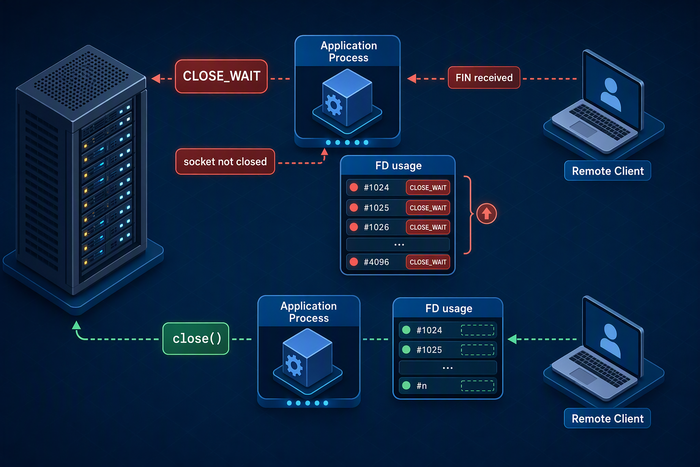
A growing number of CLOSE_WAIT connections on a Linux server usually means the remote peer has closed its side of the connection, but the local application has not closed the corresponding socket. A small, short-lived group of CLOSE_WAIT sockets can be normal. If the count keeps rising and the server also reports Too many open files, failed connections, or request timeouts, treat it as a likely connection leak.
This problem is rarely fixed by tuning a TCP timeout. The investigation should focus on the process that owns the sockets, file descriptor usage, exception paths, connection pools, blocking calls, and the connection lifecycle between proxies and upstream services.
What Does CLOSE_WAIT Mean?
When the remote endpoint sends a FIN, the local TCP stack acknowledges it and places the connection in CLOSE_WAIT. The local application must then call close() so the kernel can send its own FIN and continue the normal shutdown sequence.
In practical terms, CLOSE_WAIT means the peer has already requested closure, but the local application has not finished closing the socket. Common causes include an exception path that skips cleanup, a response body that is never closed, a blocked thread, a stalled event loop, a broken connection pool, or a client library that fails to release resources.
TIME_WAITusually appears on the side that actively closes the connection and protects later connections from delayed packets.FIN_WAIT_2means the local side initiated closure and is waiting for the peer's FIN.CLOSE_WAITmeans the peer sent FIN while the local application still owns an open socket.
Confirm That CLOSE_WAIT Is Actually Accumulating
Start with a summary of TCP socket states:
ss -s
List all sockets currently in CLOSE_WAIT:
ss -tan state close-wait
Count them without printing the header:
ss -Htan state close-wait | wc -l
Watch the count over time:
watch -n 2 'ss -Htan state close-wait | wc -l'
A single snapshot does not prove a leak. The stronger signal is a count that rises continuously, does not fall during low traffic, or remains concentrated on the same local port, remote endpoint, and process.
Group Connections by Port and Remote Endpoint
Group the sockets by local address and port:
ss -Htan state close-wait | awk '{print $4}' | sort | uniq -c | sort -nr | headThen group them by remote address and port:
ss -Htan state close-wait | awk '{print $5}' | sort | uniq -c | sort -nr | headOutput columns can vary slightly between distributions and ss versions, and IPv6 addresses contain colons. Inspect a few raw lines before assuming fields four and five are the local and remote endpoints. Avoid splitting IPv6 addresses on every colon.
If most sockets involve port 80, 443, a database port, or an internal API port, you can usually narrow the problem to a web service, reverse proxy, database client, or application integration.
Find the Process That Owns the Sockets
With sufficient privileges, ask ss to display process information:
sudo ss -tanp state close-wait
You can also use lsof:
sudo lsof -nP -iTCP -sTCP:CLOSE_WAIT
Record the process name, PID, local port, and remote endpoint. If most connections belong to one PID, continue the investigation inside that process. In a container or Kubernetes environment, map the host PID to the correct container or Pod so a proxy process is not mistaken for the application that created the connection.
Check Whether File Descriptors Are Near Their Limit
Every socket consumes a file descriptor. After identifying the PID, count the descriptors currently open by the process:
pid=<PID>
ls -1 /proc/$pid/fd | wc -l
Check the process soft and hard limits:
cat /proc/$pid/limits | grep -i 'open files'
Inspect system-wide file handle allocation and the configured limit:
cat /proc/sys/fs/file-nr
sysctl fs.file-max
If the process FD count keeps rising toward Max open files, logs may show Too many open files, connection failures, or errors opening ordinary files. Raising ulimit -n may delay the outage, but it does not repair a socket leak. Unreleased connections will eventually consume the larger limit as well.
Common Application-Level Leak Sources
Exception paths skip cleanup
The normal path may call close(), while timeout, parsing failure, early return, or exception paths do not. Review every exit path and use structured cleanup mechanisms such as finally, defer, context managers, or managed resource objects.
HTTP or database connections are not returned to the pool
A connection pool does not guarantee correct cleanup. A response body that is not fully consumed or closed, an unclosed result set, an unfinished transaction, or a borrowed connection that is never returned can leave sockets attached to the process. Compare active, idle, and waiting connection counts with the pool configuration and recycling logs.
The business timeout does not stop the socket operation
Some applications return a timeout to the caller while the network operation continues to block in the background. Configure connect, read, write, and overall request timeouts deliberately, and confirm that cancellation reaches the underlying client library. A timeout message alone does not prove that the socket was released.
Threads, event loops, or workers are blocked
A thread dump, runtime profiler, or event-loop delay metric can show whether the code responsible for closing connections is no longer running. For native processes, strace can help during a controlled diagnostic window, but tracing can add overhead and expose request data. Limit it to the affected PID and keep the capture short.
Proxy and upstream keepalive settings do not match
NGINX, application servers, service meshes, and upstream clients can have different keepalive limits and timeout expectations. One side may close idle connections while another component continues to retain them. Compare keepalive timeout, maximum requests per connection, upstream idle timeout, and health-check behavior across the full request path.
Use Process Evidence to Locate the Leak
Once the affected PID is known, combine socket data with process data instead of immediately changing global kernel parameters:
sudo lsof -nP -p <PID> | wc -l
sudo ls -l /proc/<PID>/fd | head
sudo cat /proc/<PID>/status | grep -E 'Threads|FDSize'
sudo ss -tanp state close-wait
Correlate the growth with request rate, error logs, dependency timeouts, thread count, connection-pool metrics, and deployments. If the rise begins after a release or appears only when one dependency fails, that timing can expose a missing cleanup path.
How to Restore Service Safely
If FD usage is close to the limit and new connections are failing, restore capacity before completing the full code investigation:
Remove one affected instance from the load balancer or stop sending it new traffic.
Capture the socket list, PID, FD count, application logs, and runtime diagnostics.
Restart or replace that instance so the operating system releases its descriptors.
Verify health checks and error rates before returning it to service.
Repeat the process gradually for other affected instances.
Restarting releases leaked sockets, but it does not prove the root cause is fixed. If CLOSE_WAIT begins growing at the same rate after the restart, the application still contains the leak.
Changes That Usually Do Not Fix CLOSE_WAIT
Reducing net.ipv4.tcp_fin_timeout
tcp_fin_timeout primarily controls how long an orphaned connection remains in FIN-WAIT-2. A CLOSE_WAIT socket is waiting for the local application to close it, so reducing this value does not call close() on the application's behalf.
Only increasing the file descriptor limit
A larger limit can be appropriate when legitimate concurrency requires it, but it should follow capacity planning. When a leak exists, a higher limit merely allows the process to accumulate more abandoned sockets before failing.
Forcibly deleting every connection
Bulk connection termination can interrupt healthy requests and still leaves the cleanup bug unchanged. During an incident, isolate the responsible process or instance and use controlled traffic draining and rolling recovery.
Verify the Fix
After deploying the application fix, observe at least one representative peak and low-traffic period:
watch -n 5 'ss -Htan state close-wait | wc -l'
The
CLOSE_WAITcount should fluctuate within a reasonable range instead of increasing continuously.The process FD count should be able to fall and generally follow concurrent workload.
Connection success rate, application errors, and latency should return to normal.
Pool active, idle, and waiting counts should match the intended configuration.
The issue should not return after an equivalent traffic period.
Trend alerts for CLOSE_WAIT, process FD utilization, and connection-pool waiters are often more useful than a single fixed threshold. Growth rate can reveal a leak before the process reaches its hard limit.
Frequently Asked Questions
How many CLOSE_WAIT connections are too many?
There is no universal safe number. Duration, growth trend, FD utilization, service errors, and concentration in one process are more meaningful than a single count.
Will CLOSE_WAIT connections disappear automatically?
They normally disappear after the local application closes the socket, or after the process exits and the kernel releases its resources. Waiting for the operating system does not replace fixing the application lifecycle.
Will restarting NGINX solve the problem?
If NGINX owns the sockets, a restart or graceful replacement may temporarily release them. If an upstream application owns them, restarting NGINX may have no effect. Confirm the PID with ss -p or lsof first.
Is CLOSE_WAIT the same as ephemeral port exhaustion?
No. CLOSE_WAIT sockets consume sockets and file descriptors, while ephemeral port exhaustion concerns the local port range used for outbound connections. FD usage, TCP states, and local port allocation should be measured separately.
Conclusion
When a Linux server accumulates CLOSE_WAIT connections, use a consistent sequence: confirm the trend, group sockets by endpoint, identify the owning PID, check file descriptors, and inspect exception handling, response cleanup, connection pools, timeouts, and blocked execution paths. A rolling restart may restore capacity during an incident, but the durable fix is for the application to close every socket correctly and for monitoring to confirm that socket and FD counts recover after load falls.
References
RFC Editor, Transmission Control Protocol (TCP), RFC 9293
https://www.rfc-editor.org/rfc/rfc9293Linux man-pages, ss(8)
https://man7.org/linux/man-pages/man8/ss.8.htmlLinux Kernel Documentation, IP Sysctl
https://docs.kernel.org/networking/ip-sysctl.htmlLinux Kernel Documentation, /proc filesystem
https://docs.kernel.org/filesystems/proc.htmlNGINX Documentation
https://nginx.org/en/docs/
Sources checked: August 31, 2026.
