

CDN Purge and Preheat in Practice: Get the Order Wrong and Nothing Works
Last year, a client updated their homepage but users still saw the old version. They ran a preheat in the CDN console. Waited 30 minutes. Still old content.
"What's wrong with the preheat function?" they asked.
I asked: "Did you run a purge first?"
CDN caches don't update automatically. When the origin file changes, CDN nodes still serve the cached old version. Preheating does not overwrite existing cache – it only caches the "current" version.
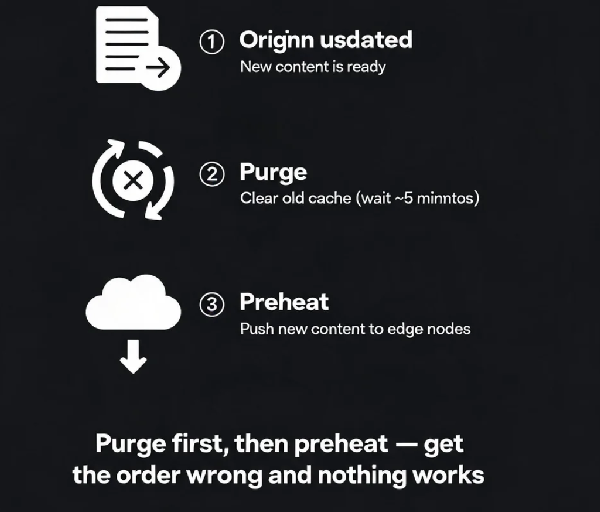
The correct order is: purge first, then preheat. Get it wrong, and you've wasted your time.
01 Purge and Preheat Are Completely Different Operations
Purge – Instructs CDN nodes to mark cached resources as expired. On the next request, the node fetches the latest version from the origin and re‑caches it.
Preheat – CDN nodes proactively fetch resources from the origin and cache them. Users' first request hits the cache immediately.
| Operation | Effect | Hit rate impact | Use case |
|---|---|---|---|
| Purge | Removes old cache, forces origin fetch | Temporary drop | Content update, correction |
| Preheat | Proactively loads resources to nodes | Increase | Flash sales, first deployment, large file releases |
That client only preheated. The existing old cache on the nodes was never cleared. Preheat doesn't overwrite old cache – it only caches what it sees from the origin. The old version stayed.
02 Purge First, Then Preheat – Order Matters
After an origin update, the correct order is: run a purge first, wait for it to complete (typically 5 minutes), then run a preheat.
Why can't you skip the purge? Preheat does not overwrite existing cache. If nodes already have an old copy, a preheat won't replace it. Users will still see the old version.
Why can't you preheat before purging? You'd be pushing the current version to edge nodes, then purging it, wasting quota and bandwidth.
First deployment to a CDN: There's no existing cache, so you can preheat directly – no purge needed.
03 Scenario‑Based Strategies
Regular content updates – Update a single file: purge the URL (wait ~5 minutes), then preheat the URL. Users will see the latest version.
Major version releases – Multiple files update: use a directory purge to clear all old caches, then preheat the key resources. Large batch purges cause origin bandwidth spikes – schedule during off‑peak hours.
Resource removal (compliance/security) – Delete the origin file, then immediately purge the URL from CDN nodes to prevent further access.
The Bottom Line
That client later ran a purge on the homepage URL, then preheated the new content. Users finally saw the updated page.
"The order makes all the difference," he said. "Now I know – purge first, then preheat."
