Container Runtime Security: Preventing Container Escape and Kernel Attacks in Practice
Last year, a client’s Kubernetes cluster was compromised. The attacker didn’t exploit an application vulnerability. They broke into a container. From that container, they escaped to the host node. From the host, they took control of the entire cluster.
The root cause? The container had mounted the host’s Docker socket (/var/run/docker.sock). Inside the container, the attacker ran docker commands, created a new container, mounted the host’s root filesystem, and chrooted into it. The host was compromised.
This is the worst‑case scenario for container security: one compromised container takes down the whole cluster.
Today, let’s talk about container runtime security. Not the “security is important” fluff, but a practical guide: how container escapes happen, how to harden your runtime, and how to keep a single breach from becoming a catastrophe.
01 Why Containers Are Easier to Escape Than VMs
The biggest difference between containers and virtual machines is kernel sharing.
A VM has its own guest kernel. Escaping a VM requires breaking the hypervisor – a very high bar. Containers share the host kernel directly. An attacker who finds a kernel bug or a misconfiguration can break out of the container and onto the host.
Common escape paths:
Kernel exploits: Dirty Cow, CVE‑2016‑5195, and others – triggered from inside the container.
Dangerous mounts:
/proc,/sys, or the Docker socket mounted inside the container.Privileged containers:
privileged: truegives the container almost the same power as the host root.Misconfigured user namespaces.
That client’s container had the Docker socket mounted. The attacker controlled Docker from inside the container – they could create new containers, mount the host filesystem, and escape immediately.
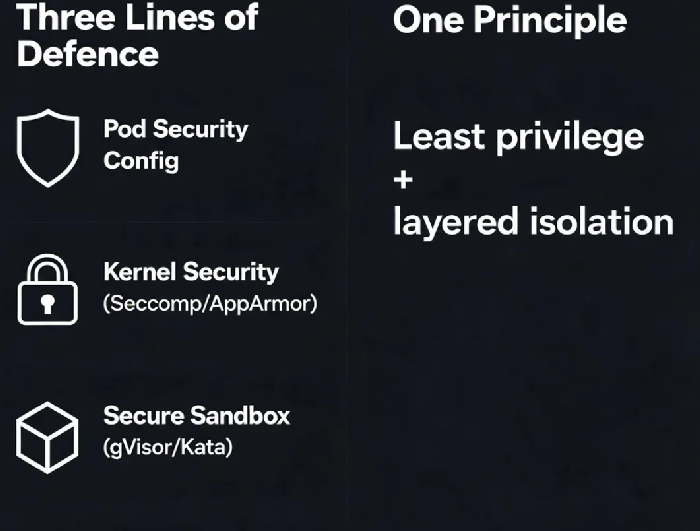
02 First Line of Defence: Pod Security Configuration
Many escapes can be prevented with simple configuration changes.
Disable privileged containers – privileged: true hands the host to the container. In Kubernetes, use Pod Security Standards (Pod Security Admission) to block privileged containers. Set the restricted profile or use OPA Gatekeeper.
Read‑only root filesystem – readOnlyRootFilesystem: true. An attacker cannot write files into the container’s root filesystem. If your app needs to write somewhere, mount a writable volume at a specific path.
Run as non‑root – runAsNonRoot: true and runAsUser: 1000. Even if the container is compromised, the attacker has a low‑privilege user. Escaping becomes much harder.
Disable privilege escalation – allowPrivilegeEscalation: false. Prevents a process from gaining more privileges than its parent. Stops many privilege‑escalation attacks.
In that client’s post‑mortem, they noted that if allowPrivilegeEscalation had been false, the attacker would not have been able to gain root inside the container – let alone escape.
03 Second Line of Defence: Linux Kernel Security
Seccomp (system call filtering)
By default, containers can call over 300 system calls. Many are never needed. Each unused syscall is an attack surface.
Kubernetes 1.19+ ships with a default Seccomp profile. Enable it with securityContext.seccompProfile.type: RuntimeDefault. For high‑security workloads, write a custom profile that allows only the syscalls your application actually uses.
AppArmor / SELinux
Restrict what a container can access – files, network, capabilities. Most managed Kubernetes clusters don’t enable AppArmor by default. You can enable it and load a custom profile.
Drop unnecessary capabilities
Start with drop: ["ALL"], then add back only what you need. Default containers have many capabilities (CHOWN, NET_ADMIN, SYS_ADMIN). Keep only essential ones like NET_RAW (for ping). Never keep SYS_ADMIN – it’s far too powerful.
04 Third Line of Defence: Secure Sandboxes
For multi‑tenant clusters or workloads that run untrusted code, normal container isolation is not enough. Use a secure sandbox runtime.
gVisor (Google open source)
A user‑space kernel. It intercepts system calls from the application and handles them in a separate, restricted kernel. Good compatibility. Performance overhead is roughly 10‑20%. Suitable for most workloads.
Kata Containers
A lightweight virtual machine. Each pod runs in its own VM, using hardware virtualization for isolation. Strong isolation. Higher performance overhead. Good for high‑security environments.
AWS Firecracker
A lightweight VMM used by Lambda and Fargate. Minimal overhead, fast boot. Not intended for direct use by most customers, but powers managed services.
After the incident, that client moved sensitive workloads to a gVisor runtime. CPU overhead increased by about 15%, but container escapes stopped completely.
05 Detection and Response: Assume You’ve Already Been Breached
No defence is perfect. Assume a container will eventually be compromised. Have detection in place.
Falco (CNCF project) – Monitors container behaviour for anomalies. Detects:
Execution of sensitive commands inside a container (e.g.,
docker,chroot)Reading of sensitive files (
/etc/shadow)Mounting sensitive paths
Unexpected process launches
Falco can trigger alerts or take automated actions (e.g., pause the container).
Audit logging – Enable Kubernetes audit logging. Record who did what to which resource. Store logs centrally. Review them regularly.
After the breach, that client deployed Falco. It now alerts within seconds if anyone tries to use the Docker socket from inside a container – or attempts any other suspicious behaviour.
06 A Real Story: One Mount, Total Compromise
A client mounted the host’s Docker socket into a Jenkins pod. The CI/CD pipeline used it to build images. It was convenient.
An attacker compromised the Jenkins pod through a vulnerability in a plugin. They found the mounted Docker socket and ran:
bash
docker run -it -v /:/host ubuntu chroot /host
They now had full root access to the host node. From the host, they accessed credentials of other pods and exfiltrated data.
Post‑incident fixes:
Removed the Docker socket mount. Switched to Kaniko, which builds images without needing the Docker socket.
Enabled Pod Security Admission to block privileged containers.
Deployed Falco to monitor for Docker commands inside containers.
Their security lead said: “We used to think container security was all about image scanning. Now we know – runtime is where the real fight happens.”
The Bottom Line
Container runtime security is not about reacting after a breach – it’s about hardening before one happens.
That client’s security lead later summarised: “Use Pod Security Admission. Run as non‑root. Make the root filesystem read‑only. Add Seccomp. Drop unnecessary capabilities. For sensitive workloads, use gVisor or Kata. And deploy Falco to watch for the things you missed.”
Is your container runtime running bare – or armoured?