Left Test Environments Running Overnight? Cloud Ephemeral Resource Lifecycle Management
Last month, a client’s cloud bill for their test environment was double the usual amount. A developer had spun up three high‑performance GPU instances three months ago for a model training task. He finished the training and forgot to turn them off. Three GPU instances, at nearly $2,000 per month, ran for three months. No one noticed.
The developer’s defense: “I thought I turned them off.”
This is not an isolated story. Test environments, dev environments, temporary branch environments – they get created, used briefly, and forgotten. The bill at the end of the month is a painful surprise.
Test environments don’t need to run 24/7. The challenge is making sure they stop running when not in use – without relying on human memory.
Today, let’s talk about ephemeral resource lifecycle management. Not the “remember to shut down” fluff, but a practical guide: how to make resources automatically destroy themselves after use.
01 Why Manual Cleanup Doesn’t Work
Many companies tag resources with an expiration date (“expiry: 2025‑06‑01”) and expect someone to manually check and turn them off.
Problems:
People forget. Who remembers to check an expiration tag set three months ago?
People are lazy. Manually auditing all resources is tedious. It doesn’t get done.
People are afraid. “What if I turn off something someone else needs?” So they leave it.
That client’s GPU instances had a tag “ml‑training” but no expiry. The developer who created them left the company. No one knew what those instances were for. Everyone was afraid to turn them off.
Manual processes always fail. Automate.
02 Classify Resources: Permanent vs Ephemeral
Not every resource should be auto‑destroyed. Classify first.
Permanent: Production, long‑running databases, shared services. Never auto‑destroy.
Semi‑permanent: Staging, long‑lived test environments. Can be shut down outside working hours.
Ephemeral: Developer personal environments, branch environments, CI/CD runner instances, experimental resources. Destroy after use.
That client’s GPU instances were clearly ephemeral – created for a specific training task. But no one had defined the classification, so no one managed them.
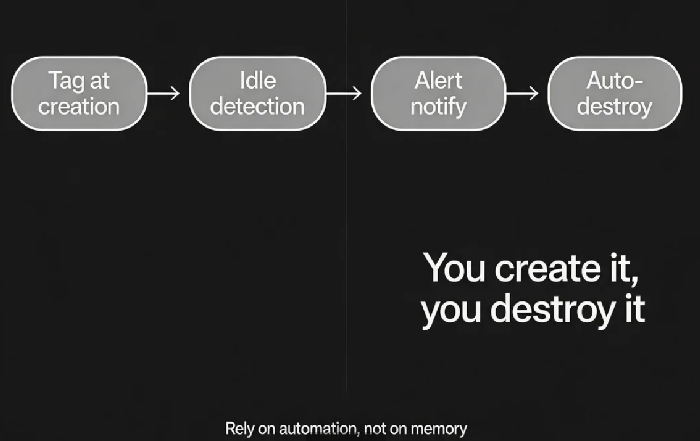
03 A Four‑Step Lifecycle Management Process
Step 1: Tag at creation
Every resource must carry tags:
owner: who created itpurpose: what it’s forttl: time to live (hours or days)auto‑off: yes/no
Infrastructure as Code (Terraform, CloudFormation) can enforce these tags at creation.
Step 2: Idle detection
Some resources have no explicit TTL. They need idle detection.
Detection criteria:
Last access time: No traffic in the last 7 days?
CPU utilisation: Average CPU <5% for the last 7 days?
Network I/O: Almost zero traffic for the last 7 days?
Resources meeting the criteria are marked “idle – pending review.”
Step 3: Alert and notify
Don’t delete idle resources immediately. Send warnings first.
Day 1: “Your resource has been idle for 7 days. It will be stopped in 3 days.”
Day 3: “Final warning. Your resource will be stopped tomorrow.”
Day 4: Stop the resource. Send notification: “Resource stopped.”
Step 4: Auto‑destruction
Stopping is not deleting. Stop the instance first (keep the disk). Observe for a period. Then delete.
After 7 days stopped: if no one restarted it, delete the instance.
After 30 days deleted: keep a snapshot in cold storage for emergency recovery.
That client implemented automation: Terraform enforced TTL tags at creation. A daily scan identified resources older than their TTL. Those resources were stopped automatically. After 7 days stopped, they were deleted. Test environment costs dropped 60% in three months. Their ops lead said: “We used to look at the bill like a mystery box. Now we know what to expect.”
04 How to Implement It
On AWS:
Tag resources with
expirationandauto‑offUse AWS Config + Lambda to scan for non‑compliant resources
Use Systems Manager Automation to stop and terminate instances
On Kubernetes:
Use namespaces to isolate ephemeral environments
Set ResourceQuota limits
Run a CronJob that deletes namespaces older than a certain age
Generic script approach:
Use cloud SDKs to list all resources
Filter by tags (owner, TTL, creation time)
If TTL exceeded → call shutdown API → log the action
05 Cultural Support: “You Create It, You Destroy It”
Technology alone isn’t enough. You need accountability.
You create it, you destroy it. The creator’s tag is mandatory.
Show the cost. Monthly reports by team and by owner. Highlight resources that were left running.
Regular reviews. Look at unused resources at the end of each month. Improve automation based on what you find.
That client added “test environment cost” to each team’s OKRs. Teams had a monthly budget. Exceeding it required explanation. Developers became much more careful about what they spun up – and much more diligent about shutting down.
The Bottom Line
Leaving test environments running overnight isn’t about laziness. It’s about lack of process.
That client’s ops lead later said: “We used to rely on good intentions. The bill taught us otherwise. Now we rely on automation. If you forget to turn it off, the system does it for you.”
Your test environments – do you rely on memory, or on automation?