Data Lake vs Data Warehouse: Should You Build One? How to Get Started?
Last year, a client asked me: “We’re thinking of moving all our data to S3 and using Presto to query it. We could save a ton on our warehouse bill. Should we just get rid of the warehouse?”
I asked: “How many tables do you have in your warehouse?”
“A few hundred.”
“How many users?”
“Dozens of analysts.”
“What’s the typical query response time?”
“Mostly sub‑second, some slow ones at a few seconds.”
“Do you think querying raw files in S3 with Presto will be faster or slower?”
He paused.
This is the common misconception about data lakes: thinking a data lake is a cheap replacement for a data warehouse. It’s not a replacement. It’s a complement.
Today, let’s talk about data lakes vs data warehouses. Not the “data lakes are important” fluff, but a practical guide: what’s the difference, when should you build a lake, and how do you keep it from becoming a swamp?
01 Data Warehouse vs Data Lake – Different Animals
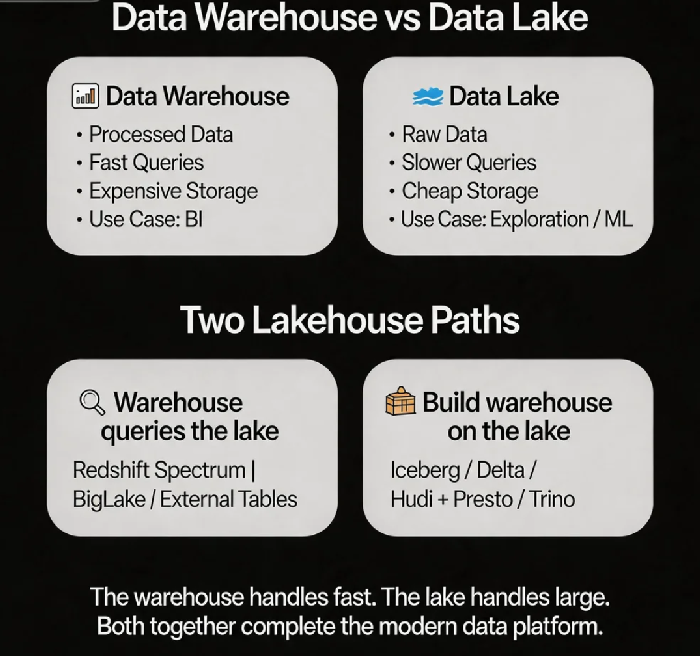
Data warehouse: Stores processed, structured, cleaned data. You know how you’re going to use it before you load it. Queries are fast, but storage is expensive. Good for BI dashboards and fixed analyses.
Data lake: Stores raw, unprocessed data – structured, semi‑structured, unstructured. You don’t know how you’ll use it when you store it. Storage is cheap, but queries are slower. Good for data exploration, machine learning, and log analytics.
Think of it this way: a warehouse is a premium grocery store. The products are already washed, cut, and packaged. Convenient, but expensive. A data lake is a wholesale warehouse. Everything is raw. It’s cheap, but you have to do the prep work yourself.
That client wanted to replace their warehouse with a lake. They wanted to shut down the premium grocery store and cook all their meals from scratch using wholesale ingredients. It’s possible, but every analyst would become a data chef – and productivity would drop.
02 The Three Pitfalls of Data Lakes
A data lake is not “dump files into S3 and you’re done.” Without governance, a lake becomes a swamp.
Pitfall 1: No governance, impossible to query
You have a mix of JSON, CSV, Parquet – no metadata, no partitioning, no compression. Presto does a full scan every time. Queries are painfully slow.
Fix: Add a metadata layer. Use Glue, Data Catalog, or Hive Metastore to manage schemas, partitions, and file formats.
Pitfall 2: Inconsistent formats
One team stores Parquet. Another stores CSV. Another stores Avro. Query engines need different logic for each format.
Fix: Standardise on a single format. Parquet is the best choice (columnar, good compression) or ORC. Convert data at write time.
Pitfall 3: Weak or no ACID
Traditional Hive tables don’t support upserts or deletes. Updating a single record in a data lake may require rewriting an entire partition.
Fix: Use a table format – Iceberg, Delta Lake, or Hudi. These add ACID transactions, time travel, and schema evolution.
03 The Lakehouse: Best of Both Worlds
A data warehouse has low storage cost? No. Fast queries? Yes. A data lake has cheap storage but slow queries.
The lakehouse gives you both. Store data in a lake, but organise it like a warehouse. Query with warehouse‑speed engines, but pay lake‑level storage costs.
Two ways to build a lakehouse:
Path 1: Warehouse queries the lake – Redshift Spectrum, BigLake, Snowflake external tables. The warehouse stores only metadata. Queries scan files directly on the lake. Performance is slower than pure warehouse but faster than a raw lake query. Good for cold data or infrequent queries.
Path 2: Build a warehouse on the lake – Use table formats (Iceberg, Delta, Hudi) to organise lake data. Query with Presto, Trino, or Spark. Performance approaches a traditional warehouse, but storage costs are much lower. Good for hot data where you need good performance without the warehouse price tag.
That client ended up with a hybrid approach: hot data stayed in the warehouse. Cold data was archived to S3. Queries for cold data used Redshift Spectrum. Warehouse storage dropped from 10TB to 2TB, and costs fell 60%. Analysts queried hot data directly from the warehouse. When they needed historic data, the query automatically fell back to Spectrum. They didn’t even notice.
04 Should You Build a Data Lake?
You need a data lake if:
You have large volumes of unstructured data (logs, images, videos)
Your data volume is massive (petabytes) and a warehouse is too expensive
You’re doing data exploration – you don’t yet know how you’ll use the data
You need raw data for machine learning training
You don’t need a data lake if:
Your data is all structured and fits comfortably in a warehouse
Your analysts only know SQL and don’t want to learn new tools
You need sub‑second query performance
You don’t have data engineering resources
That client had a log analytics use case – terabytes per day. Storing logs in a warehouse was too expensive. The lake was perfect. But their core BI dashboards stayed in the warehouse.
05 Technical Choices for a Data Lake
Storage format: Parquet is the default choice. Columnar, excellent compression, supports nested data. ORC is also fine but has a narrower ecosystem.
Table format:
Iceberg: Time travel, schema evolution, hidden partitioning. Good for historical analysis.
Delta Lake: ACID, streaming and batch, Z‑Order optimisation. Good for Spark ecosystems.
Hudi: Incremental processing, upserts, record‑level changes. Good for CDC pipelines.
Query engine:
Athena / Presto: SQL on the lake. Good for BI analysts.
Spark: ETL, complex transformations. Good for data engineers.
Trino: High‑performance distributed SQL. Good for large‑scale queries.
Metadata: Glue, Data Catalog, Hive Metastore.
06 A Real Story: Log Platform from Warehouse to Lake
A client had 5TB of log data per day stored in a warehouse. Storage cost was $20,000 per month. Queries were mostly “error count in the last 7 days” – not performance‑sensitive (minutes were fine).
They rebuilt their pipeline:
Logs landed in S3, partitioned by date, stored as Parquet.
Metadata in Glue.
Queries via Athena.
Cost: S3 storage ~$3,000 per month. Athena pay‑per‑scan. Total monthly cost under $5,000. A 75% reduction. Query performance: scanning one day of data, results in under 10 seconds. Analysts accepted the trade‑off.
Their data lead said: “Storing logs in the warehouse was convenient but too expensive. The lake is cheap and fast enough.”
The Bottom Line
A data lake is not a replacement for a data warehouse. They are partners.
That client’s CTO later said: “The warehouse handles fast queries. The lake handles large data. Together, they complete the modern data platform.”
Your data – belongs in a warehouse, a lake, or both?