MLOps in Practice: Managing the Machine Learning Lifecycle from Training to Production
Last year, a client’s data science team spent three months training a recommendation model. Offline metrics looked great. They put it into production. Click‑through rates didn’t go up. They went down.
The data scientists were confused. “Offline AUC was 0.82. What went wrong?”
The problem: the offline training used a feature distribution that didn’t match the real‑time online distribution. Offline, they used the user’s average click‑through rate over the last 30 days. Online, the model received the current day’s real‑time click rate. The distributions were different. The model was confused.
This is the classic MLOps failure: the model trains perfectly offline, but fails online. Not because the model is bad, but because the pipeline around it is broken.
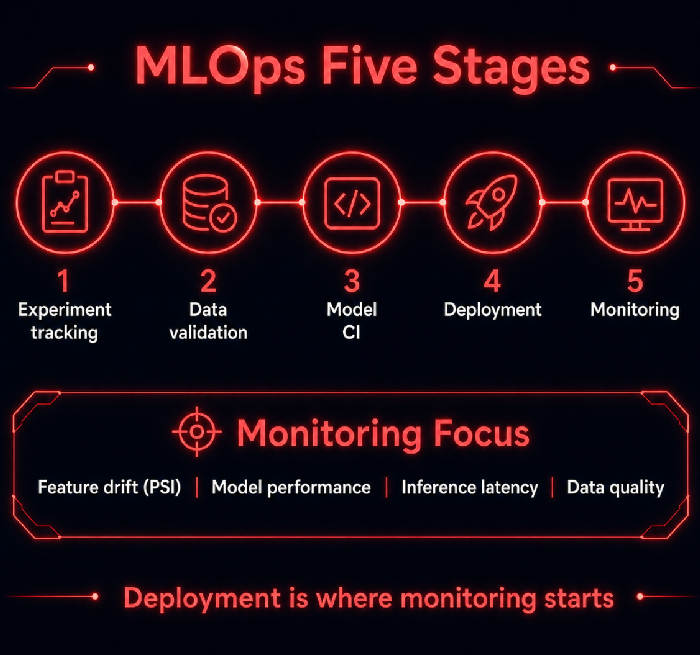
Today, let’s talk about MLOps. Not the “machine learning is important” fluff, but a practical guide: how to manage the machine learning lifecycle – from experiment tracking to data validation, model CI, deployment, and monitoring for drift.
01 Experiment Tracking: Don’t Let Training Become Voodoo
Data science teams often run dozens or hundreds of experiments. Three months later, no one remembers which data version, which hyperparameters, or which code branch produced the best model.
What to track:
Code version (Git commit)
Data version (data snapshot or DVC version)
Hyperparameters (learning rate, batch size, number of layers)
Evaluation metrics (AUC, accuracy, recall, F1)
Environment dependencies (library versions, CUDA version)
Tools: MLflow, Weights & Biases, Neptune
That client started using MLflow to track every experiment and DVC to version datasets. Three months later, they could reproduce any past experiment exactly.
02 Data Validation: Bad Data In, Bad Model Out
How good is the data you’re training on? Are there null values? Has the distribution shifted? Is there data leakage?
Data validation checks:
Null ratio: a feature’s null rate jumps from 1% to 50%
Distribution shift: PSI (Population Stability Index) exceeds a threshold
Data leakage: future data was used in training
Label leakage: features that won’t be available at prediction time are present in training
Tools: Great Expectations, TensorFlow Data Validation, Deequ
The client’s feature drift problem could have been caught before training if they had run data validation. The distribution of the “today’s click rate” feature was different from the “30‑day average” used in training. No validation meant no warning.
03 Model CI: Test Before You Deploy
Code has unit tests. Models should too.
Model CI tasks:
Inference latency test: does a single prediction meet the SLA?
Model size check: is the model small enough to deploy?
Performance validation: test on a small batch of recent production data – compare to the baseline model.
Robustness test: does the model crash on missing features or outlier values?
That client added a model CI step. After every training run, the pipeline automatically tested the model on a small sample of recent production data. If the prediction distribution differed significantly from the current production model, the deployment was blocked.
04 Model Deployment: More Than Copying a Pickle File
Deployment isn’t just uploading a .pkl file. Several patterns exist.
Online API: real‑time inference, low latency. Use TensorFlow Serving, TorchServe, Seldon, BentoML.
Batch processing: scheduled runs, high throughput. Use Spark, Airflow.
Edge deployment: on‑device inference. Requires model quantisation and pruning.
Deployment strategies:
Canary: send 5% of traffic to the new model, observe, then ramp up.
Blue‑green: both old and new models live side by side. Switch traffic instantly.
A/B test: randomly split traffic to compare performance.
That client used to deploy models by copying a pickle file into a Flask app. No versioning, no rollback. They switched to TensorFlow Serving with MLflow Model Registry. Versions were tracked. Rollbacks were one click.
05 Monitoring: Launch Is Only the Beginning
Once a model is in production, its performance will degrade over time. Why?
Feature drift: user behaviour changes. The distribution of input features shifts.
Concept drift: the relationship between features and the target changes. (Example: after a pandemic, shopping habits changed.)
Data quality: upstream pipelines break. Features become missing or corrupted.
What to monitor:
Model performance: accuracy, AUC, recall (requires ground truth labels, which may be delayed)
Feature distribution: PSI (Population Stability Index). Alert when drift exceeds a threshold.
Inference latency: P99 response time.
Data quality: null rate, outlier rate.
Tools: Evidently, WhyLogs, SageMaker Model Monitor
That client added feature drift monitoring. When the distribution of “daily login count” changed significantly, an alert fired. The data science team retrained the model on fresh data before performance degraded further.
06 A Real Story: Early Detection of Model Decay
A financial risk model was stable for three months. In the fourth month, the default rate started to rise.
The monitoring system flagged feature drift: the feature “number of logins in the last 30 days” had changed. The product team had changed the login policy; users were logging in less frequently. The model hadn’t adapted.
The data science team retrained the model with new data. AUC recovered from 0.75 to 0.82. Without monitoring, they might have discovered the problem only after significant defaults occurred.
The risk lead said: “We used to think the model was done once it was deployed. Now we know – deployment is when monitoring starts.”
The Bottom Line
MLOps is not about putting a model behind an API and calling it done.
That client’s CTO later summarised: “Track experiments. Validate data. Test before deploy. Monitor after launch. Watch for drift.”
Your models – from training to production – how many of these steps are you missing?