Cloud Key Management in Practice: KMS, Key Rotation, and BYOK – The Key Matters More Than the Lock
Last year, a client faced a compliance audit. The auditor asked: “How often do you rotate your encryption keys?”
“We haven’t. They’ve been the same for three years,” the client admitted.
The auditor then asked: “Have you revoked the key permissions of former employees?”
“I think so.”
The auditor replied: “ ‘I think so’ is not enough. Prove it.”
A review found that a developer who had left three years ago still had an active KMS policy granting them permission to use a key. No one remembered the key existed, but theoretically, they could still call it.
This is the most overlooked part of data protection: the encryption algorithm can be perfect, but if the key is mismanaged, the encryption is worthless.
Today, let’s talk about cloud key management. Not the “encryption is important” fluff, but a practical guide: how to manage keys, how often to rotate them, who has access, and what to do when a key is lost.
01 First, Understand the Core Concepts
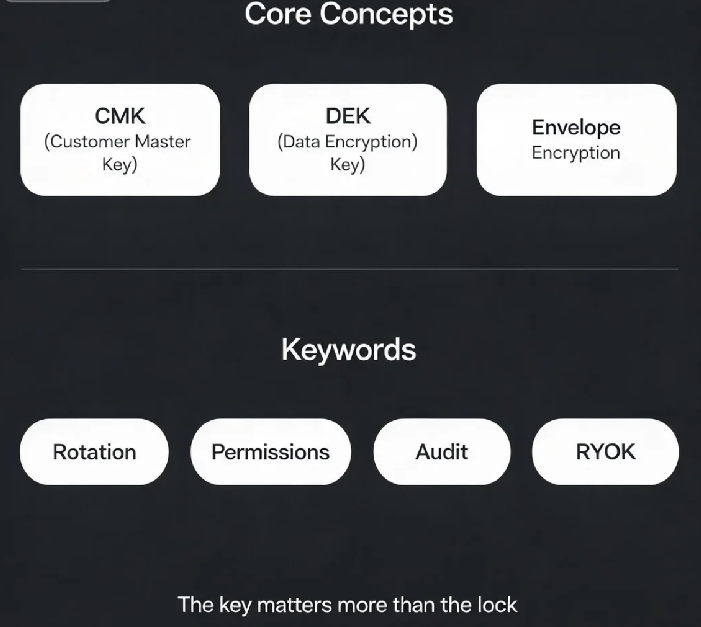
CMK (Customer Master Key) – The top‑level key you create. It encrypts other keys or small amounts of data (up to 4KB). It does not directly encrypt large business data.
DEK (Data Encryption Key) – A symmetric key that actually encrypts business data. The CMK encrypts the DEK, and the DEK encrypts the data. This is called envelope encryption.
Why envelope encryption?
Performance: cloud services can cache DEKs.
Flexibility: you can rotate DEKs frequently without touching the CMK.
Scale: the DEK handles large data; the CMK stays in the KMS.
Typical flow:
To encrypt: KMS generates a DEK, the CMK encrypts it, and the returned ciphertext DEK is stored alongside the encrypted data.
To decrypt: the ciphertext DEK is sent to KMS, the CMK decrypts it, and the plaintext DEK is used to decrypt the data.
That client had been using a CMK to directly encrypt small configuration values. They never needed to rotate the key. But the real risk was the lingering permission of a departed employee – not the encryption algorithm.
02 Key Rotation: Why You Must Do It
The longer a key is in use, the higher the risk of compromise.
Former employees might still remember the key.
Keys can leak through logs, backups, or memory dumps.
While breaking modern encryption is nearly impossible, the risk accumulates over time.
Rotation strategies:
Automatic rotation (recommended): Most cloud KMS services support automatic CMK rotation once per year. The old key is retained for decrypting old data; the new key encrypts new data. The application is unaware.
Manual rotation: Create a new CMK and update your application configuration to use it. May require a restart.
DEK rotation: In envelope encryption, you can rotate the DEK frequently without affecting the CMK. The application doesn’t even notice.
That client enabled automatic CMK rotation after the audit. Now, every year, their keys are rotated automatically. Old keys are kept for decryption; new keys are used for encryption.
03 Permissions: Who Can Use the Keys
KMS permissions must follow the principle of least privilege.
Separation of roles:
KMS administrator: Can create, delete, and rotate keys. Cannot use keys to encrypt or decrypt data.
Application user: Can only use specific keys (encrypt/decrypt). Cannot manage keys.
Auditor: Can view KMS logs. Cannot perform any key operations or crypto operations.
Common mistake: Granting a service account full KMS admin permissions. If that service account is compromised, the attacker can delete all keys.
04 Auditing: Who Used Which Key and When
KMS audit logs record every API call: which key, what operation (Encrypt, Decrypt, GenerateDataKey), when, from which IP, and by whom.
What you must monitor:
Encrypt, Decrypt, GenerateDataKey
Enable, disable, delete, rotate key
Modify key policies
What audits reveal:
Anomalous usage (e.g., bulk decryption at 3 AM)
Departing employees exfiltrating data before they leave
Proof of compliance
That client’s audit logs showed that the departed employee had never actually called the key in three years. No risk. But if they had, the logs would have caught it.
05 BYOK: Bring Your Own Key
Some customers do not trust cloud providers to manage their keys. BYOK lets you import your own key material.
How BYOK works: Generate a key in your own on‑premises HSM, import it into the cloud KMS. The cloud KMS stores and uses the key material but does not have access to the original key material outside the HSM.
Pros: You retain root control. Even if the cloud provider is compelled, they cannot access the raw key material. Good for high‑sensitivity data.
Risk: If you lose the original key material, your cloud data is also lost. You must back up your keys securely.
06 Cloud HSM: Hardware‑Grade Protection
KMS is built on HSMs (Hardware Security Modules), but those HSMs are shared. Cloud HSM gives you a dedicated, single‑tenant HSM.
KMS vs Cloud HSM:
| Feature | KMS | Cloud HSM |
|---|---|---|
| Compliance | FIPS 140‑2 Level 2/3 | FIPS 140‑2 Level 3 |
| Isolation | Logical | Physical (dedicated hardware) |
| Performance | High (shared) | Higher (dedicated) |
| Cost | Low | High |
| Management | Fully managed | Partially self‑managed |
Cloud HSM is for high‑regulation scenarios (finance, government). For most businesses, KMS is sufficient.
07 A Real Story: A Key That Never Should Have Been There
A client used a KMS CMK to encrypt a database for three years, never rotating it. A former employee claimed they could still access the data. The company panicked.
An audit revealed: the ex‑employee’s IAM permissions had been revoked, but a KMS policy still listed their principal. The key had never been used by them, but the policy was a compliance gap.
What they fixed:
Revoked all stale KMS policies.
Enabled automatic key rotation (annual).
Configured CloudTrail alerts for unexpected Decrypt calls.
Their security lead said: “I used to think encryption meant safety. Now I know – managing the key is where safety lives or dies.”
The Bottom Line
Key management is not a nice‑to‑have. It is the foundation of data protection.
That client’s security lead later said: “Rotate your keys. Separate permissions. Watch the logs. BYOK gives you control, and cloud HSM gives you compliance – but if you lose the key, no one can save you.”
How old are your keys? Who still has access? Who is using them? Go check today.