Logs Too Expensive to Keep? Cloud Log Sampling and Cost Optimization in Practice
Last year, a client had a microservices architecture generating several terabytes of logs per day. They kept 30 days of logs. The monthly storage bill was enormous. The manager asked: “Can we cut costs?” The technical lead answered: “We need full logs. If something breaks, we’ll need them to debug.”
We ran an analysis. Over the previous six months, the only logs ever used were ERROR‑level logs and traces for slow requests. The rest – INFO and DEBUG – were never queried. 90% of the storage cost was for logs no one ever read.
This is the classic log management dilemma: keep everything and it’s too expensive. Keep less and you’re afraid you’ll miss something.
Today, let’s talk about cloud log sampling and cost optimization. Not the “logs are important” intro, but a practical guide: how to sample without losing critical information, how to tier storage, and how to save money without compromising your ability to debug.
01 Full Logs ≠ Safety
Many people assume that storing every log line makes them safer. Wrong.
Storing full logs that you never analyse is just waste.
Full logs increase storage costs, query costs, and transfer costs.
Over time, you’re afraid to delete old logs, and querying them becomes painfully slow.
That client kept six months of INFO and DEBUG logs. They never looked at them. The only logs used for debugging were ERROR logs and traces of slow requests. 90% of their storage bill paid for data that was never read.
02 Sampling Strategies: Not Random Drop
Sampling is not “drop half the logs randomly.” You must preserve the valuable ones.
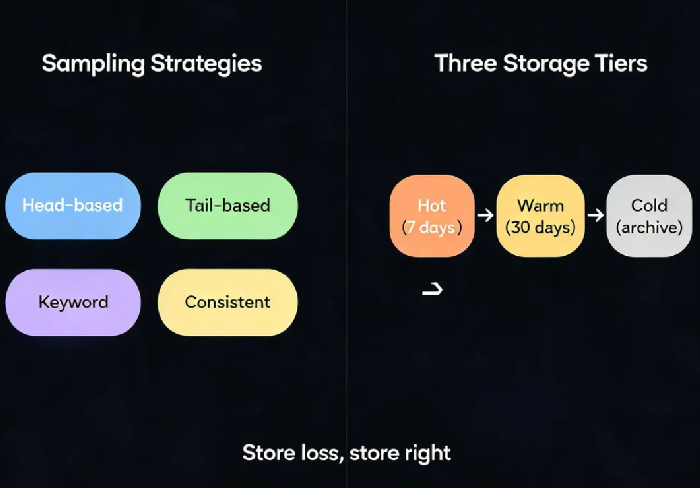
Head‑based sampling: At the request entry point, sample a fixed percentage (e.g., 10%). All logs for that request are kept. Simple, works for uniform traffic. May miss rare errors.
Tail‑based sampling: Don’t decide immediately. After the request finishes, determine if it’s valuable. Keep all logs for errors, slow requests, or anomalies. Drop normal requests. Perfect for catching rare errors, but requires processing after the request.
Keyword sampling: Keep only logs containing specific keywords (ERROR, WARN, timeout). Simple, low overhead. May miss errors that don’t match the keyword list.
Consistent sampling: Hash the Trace ID. All logs for the same trace are either kept or dropped together. Essential for distributed tracing – otherwise you get half a call chain.
03 Setting Sampling Rates
No universal rule. Depends on your business.
ERROR logs: 100% keep. You need every one.
WARN logs: 50‑100% keep. Depends on how frequent they are.
INFO logs: 1‑10% sampling. Higher for core business, lower for non‑critical.
DEBUG logs: 0% sampling. Only enable temporarily during active debugging.
Slow request logs: 100% keep for requests exceeding a threshold (e.g., >500ms).
That client changed their policy: ERROR and WARN at 100%, INFO at 5%, DEBUG at 0%. Slow requests (>500ms) kept 100%. Daily log volume dropped from several terabytes to 300GB. Debugging ability didn’t suffer, because the problems were always in ERROR logs or slow requests – INFO was rarely needed.
04 Storage Tiering: Hot, Warm, Cold
Different ages of logs belong on different storage tiers.
Hot tier (last 7 days): SSD / NVMe. Fast query. For logs you need frequently.
Warm tier (7‑30 days): Standard object storage. Slower but acceptable for occasional queries.
Cold tier (30+ days): Archive storage. Very cheap, retrieval takes hours. For compliance retention.
Lifecycle policies: Create logs in hot tier. After 7 days, transition to warm. After 30 days, transition to cold. After retention period, delete.
That client’s new cost structure: Hot tier kept only 7 days of ERROR logs and slow request traces. Warm tier kept 30 days of WARN and sampled INFO. Cold tier kept 90 days of everything for compliance. Monthly storage cost dropped from huge to reasonable. Querying slow requests on hot tier returned in seconds. Compliance queries on cold tier took hours – acceptable for audit purposes.
05 Sampling Is Not a Silver Bullet
Sampling has trade‑offs.
You may miss rare errors: At 1% sampling, a very infrequent error might never be captured. Solution: never sample ERROR logs. Keep them 100%.
Broken call chains: Head‑based sampling may keep part of a trace and drop another part. Solution: use consistent sampling (hash on Trace ID). All or nothing.
Not for real‑time critical systems: Sampling decisions add overhead. Solution: asynchronous sampling – write raw logs to cheap storage first, then sample asynchronously for analysis.
That client used tail‑based sampling. The system decided after the request finished. Errors, slow requests, and anomalies were kept 100%. Normal requests were sampled at 5%. Consistent sampling ensured that if a trace was kept, every log in that trace was kept.
06 A Real Story: From Expensive to Affordable
An e‑commerce client saw log volume explode during a flash sale. Storage costs were out of control. We made three changes:
Sampling policy: ERROR and WARN at 100%. INFO dropped from 10% to 1%. Slow requests (>1 second) kept 100%.
Storage tiers: Hot tier (3 days) – ERROR + slow requests. Warm tier (7 days) – WARN + sampled INFO. Cold tier (30 days) – full archive.
Enabled lifecycle policies to transition automatically.
The next month, log costs dropped by 60%. When they debugged issues during the next flash sale, they used ERROR logs and slow request traces – exactly what they needed. Their ops lead said: “We used to panic about keeping enough logs. Now we know – keeping the right logs is what matters.”
The Bottom Line
Log cost optimisation is not about blindly deleting data. It’s about keeping the valuable data and discarding the rest.
That client’s ops lead later said: “Keep all errors. Sample INFO and DEBUG. Store recent logs on hot storage, older logs on cold storage. Use tail‑based sampling for anomalies and consistent sampling for traces.”
Your logs – which ones are truly valuable, and which ones are just expensive noise? Look today. You might be surprised.