Connection Pool Tuning Is Not a One‑Time Job: Monitoring and Dynamic Optimisation in Practice
Last year, a client tuned their connection pool before a flash sale. They increased the maximum connections from 50 to 200 – they felt prepared. On the day of the sale, the connection pool still saturated. The problem wasn't the pool size. A slow query was holding connections open for seconds instead of milliseconds. The pool was large, but the connections weren't released quickly enough.
This is the overlooked reality of connection pool management: configuration is just the starting point. Continuous monitoring is what keeps you safe.
01 Configurations Become Outdated
Many people configure a connection pool once and forget about it. But workloads change, traffic changes, and databases change.
Business grows. The pool size that was appropriate six months ago may now be a bottleneck.
Code changes introduce slow queries. Connection hold time increases.
Database migration changes response times, affecting connection turnover.
Connection pool configuration is not “set and forget.” You have to watch it and adjust it.
That client’s pool saturated not because the pool was too small, but because a slow query increased the average connection hold time from 50ms to 3 seconds. At the same concurrency level, they needed dozens of times more connections. If they had looked only at the connection count, they would have assumed the pool was too small and increased it further – putting even more pressure on the database.
02 Key Monitoring Metrics
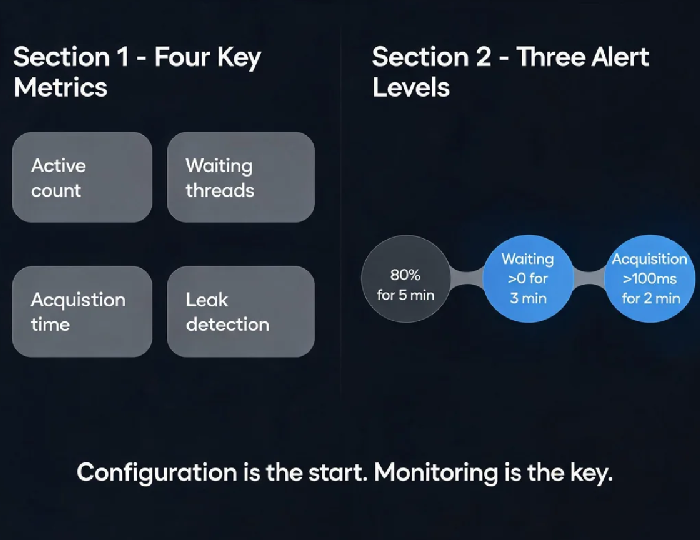
Not every metric matters. Focus on these four.
Active connections (activeCount)
The number of connections currently in use. When this approaches maximumPoolSize, the pool is near saturation. But a high active count doesn't always mean the pool is too small – it could mean connections are held too long (slow queries) or that connections are leaking.
Threads waiting (waitingThreads / threadsAwaitingConnection)
Threads waiting for a connection. If this is greater than zero for more than a few minutes, the pool is insufficient for the current workload – or connections are being held too long.
Connection acquisition time (acquireTime)
Time from requesting a connection to receiving one. Normally a few milliseconds. A sudden increase is an early warning sign of pool pressure. This metric often signals trouble before active connections saturate – by the time active connections are full, users are already timing out.
Leak detection
HikariCP’s leakDetectionThreshold – set it to 2‑3 times the normal hold time. If a connection is held longer than that, HikariCP logs a stack trace pointing directly to the code that didn't close the connection.
03 Alerting Strategy
Alerts should be timely, but not so sensitive that they cause noise.
Alert 1: Active connections > 80% of maximumPoolSize for 5 minutes
A high active count is normal during a spike. Sustained high usage is a trend. When this alert fires, check acquisition time and slow query logs before increasing the pool size.
Alert 2: Waiting threads > 0 for 3 minutes
Threads waiting for a connection means users are already experiencing delays. This is a high‑risk alert. Check slow queries, connection hold time, and potential connection leaks immediately.
Alert 3: Connection acquisition time > 100ms for 2 minutes
This is an early warning – you can investigate during the day, not at 3 AM.
That client added these three alerts. The next time a slow query appeared, they caught it at the “acquisition time” alert stage. They fixed it before users noticed any slowness.
04 Dynamic Tuning Is Not Magic
Some connection pools support dynamic adjustment, but it's not a replacement for root‑cause analysis.
HikariCP does not auto‑tune its maximum pool size. You have to evaluate and adjust manually. One strategy: lower connectionTimeout so threads fail fast rather than queueing. Then fix the root cause.
Druid supports dynamic adjustment via JMX – you can change parameters without restarting the application. But dynamic adjustment is a tactical tool; root‑cause analysis is the strategic fix.
Cloud‑native services like Tencent Cloud DBbrain can analyse connection pool health and recommend adjustments or automatically tune parameters.
That client didn’t rely on auto‑scaling the pool. They fixed the slow query. Once the hold time dropped, the existing pool size was sufficient. Expanding the pool to 1000 connections wouldn’t have helped – the database would likely have failed first.
05 A Monitoring Dashboard
A Grafana dashboard for connection pools should show:
Active connections vs maximum – how much headroom is left
Waiting threads – zero is normal; any sustained value is a problem
Acquisition time trend – a climbing trend indicates trouble
Leak detection logs – stack traces captured when connections are held too long
That client added the connection pool dashboard to their main operations screen. They used to check it only when something broke. Now they glance at it daily and catch problems early.
06 A Real Story: Slow Queries Stole the Connections
A SaaS client’s connection pool suddenly saturated. Active connections were pegged at 100%. Waiting threads were in the dozens. The pool configuration was correct – nothing had changed.
We looked at the slow query log. One SQL had degraded from 50ms to 2 seconds. Data volume had grown, and an index was no longer sufficient. Adding the right index brought the query back to 50ms. Active connections dropped from 100% to 30%.
Their ops lead said: “I used to think connection pool problems meant tuning the pool size. Now I know – first check connection hold time, then slow queries.”
The Bottom Line
Configure your pool, then monitor it continuously. Configuration is static; workloads are dynamic.
That client’s ops lead later said: “Four metrics: active count, waiting threads, acquisition time, leak detection. Alerts at three levels. Before increasing the pool size, check hold time and slow queries.”
Is your connection pool being monitored, or did you just set it and forget it?