

CDN Domain Configuration and CNAME Resolution: Accelerated Domain, Origin Domain, and SSL Certificate Binding
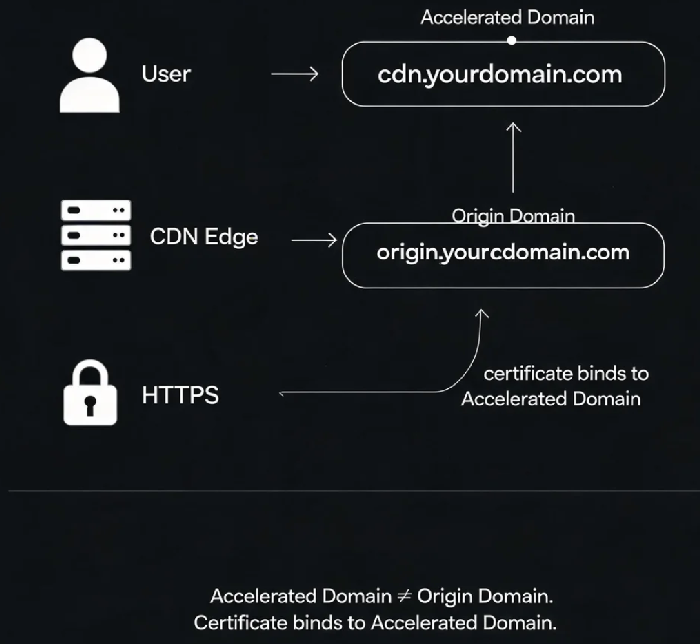
Last year, a client bought a CDN plan, filled in all the configuration fields, and set up the CNAME record. But when they tried to access their site, they got nothing but errors. After hours of debugging, we found the problem: they had set the accelerated domain and the origin domain to the same value. The CDN nodes were trying to fetch content from themselves – a loop that led straight to 502 errors .
This is the most common pitfall in CDN domain configuration: the accelerated domain and the origin domain cannot be the same.
Today, let's walk through the three core concepts of CDN domain configuration – accelerated domain, origin domain, and SSL certificate binding. Get any of these wrong, and your CDN is essentially useless.
01 Three Domains, Three Different Jobs
Accelerated domain – This is the domain users actually visit. It's the public-facing address of your CDN service. For example, when a user types cdn.yourdomain.com into a browser, that's the accelerated domain .
Origin domain (also called "回源Host") – This is the domain the CDN node uses when it fetches content from your origin server. A single origin server may host multiple websites, so the CDN needs to know exactly which site to request content from. That's what the origin domain tells it .
SSL certificate domain – An SSL certificate is tied to a specific domain name. When a user accesses your site over HTTPS, the certificate's domain must match the accelerated domain the user is visiting .
In short: users access the accelerated domain, CDN nodes use the origin domain to fetch content from your server, and SSL certificates must match the accelerated domain for HTTPS to work properly.
02 Accelerated Domain vs Origin Domain: The Most Common Mistake
The accelerated domain and the origin domain must be different. If they are the same, the CDN node will try to fetch content from itself, creating a loop and causing origin fetch to fail .
The recommended setup:
Accelerated domain:
cdn.yourdomain.com(what users access)Origin domain:
origin.yourdomain.com(what the CDN uses to reach your server)
This separation ensures that when a CDN node needs to fetch uncached content, it knows exactly where to go without creating a circular dependency .
03 SSL Certificate Binding: The Certificate Must Match the Accelerated Domain
An SSL certificate must be bound to the domain users actually visit – which is the accelerated domain, not the origin domain.
If you bind the wrong certificate – for example, a certificate for www.yourdomain.com when your accelerated domain is cdn.yourdomain.com – browsers will show a "certificate domain mismatch" error .
Certificate type matters:
Single-domain certificate: Can only bind one specific domain (e.g.,
www.example.com)Wildcard certificate: Can bind all first-level subdomains of a main domain (e.g.,
*.example.comcoverswww,cdn,api, etc.)
04 The Correct Configuration Order
Add the accelerated domain: In the CDN console, fill in the accelerated domain name and origin server information .
Get the CNAME address: The CDN provider will assign a CNAME domain, like
cdn.example.com.cdn.provider.com.Configure CNAME resolution: Go to your DNS provider and point the accelerated domain to the CNAME address .
Bind the SSL certificate: Make sure the certificate is bound to the accelerated domain .
写在最后
CDN domain configuration isn't complicated once you get the fundamentals right. There are three key takeaways to remember:
The accelerated domain and origin domain cannot be the same – keep them separate
The SSL certificate binds to the accelerated domain, not the origin domain
CNAME resolution only takes effect after DNS propagation – wait for it to complete before testing
The client who looped themselves into 502 errors eventually fixed their configuration by separating the accelerated and origin domains and rebinding the certificate correctly. If you're setting up CDN today, go double-check all three – it could save you hours of debugging.
