

Advanced CDN Cache Rules: TLS Version, Protocol Optimization, and Security Policy Configuration
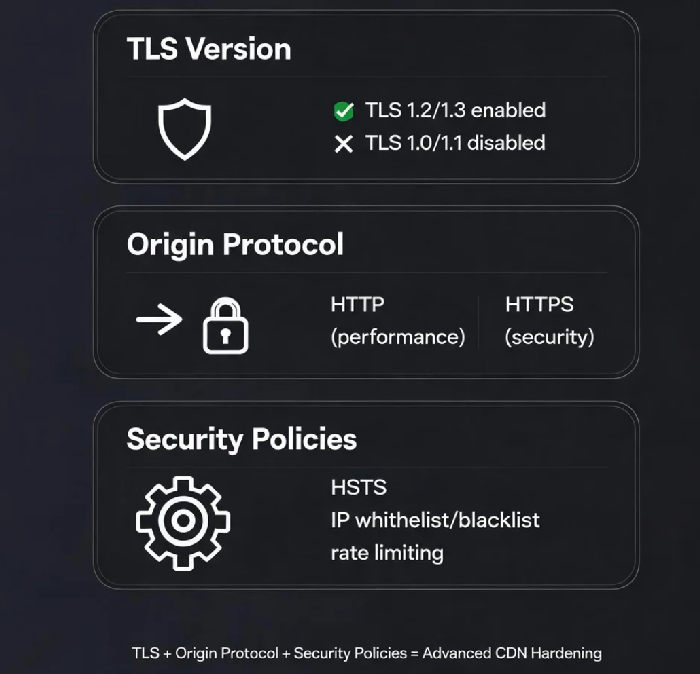
Introduction: The Missing Pieces
A client once told me: "I uploaded my SSL certificate to the CDN. HTTPS is working. We're done, right?" They had done the bare minimum, but they'd missed a whole layer of configuration that affects both performance and security: TLS version selection, origin protocol optimization, security headers, and cache rule prioritization.
Many CDN users stop at the "upload certificate" step, but a properly secured and optimized CDN requires several additional configuration decisions.
1. TLS Version Control: Security vs. Compatibility Trade‑Off
The choice of TLS versions has direct implications for user reach.
Choosing a Minimum TLS Version
TLS (Transport Layer Security) is the protocol that secures HTTPS connections. TLS 1.3, published by the IETF, offers stronger security and faster handshakes than TLS 1.2 . However, older browsers and devices may not support it.
| TLS Version | Compatibility | Security | When to Use |
|---|---|---|---|
| TLS 1.0/1.1 | Wide (older browsers) | Vulnerable, known flaws | Avoid |
| TLS 1.2 | Broad (Chrome 30+, Firefox 27+) | Strong | Enable by default |
| TLS 1.3 | Modern (Chrome 70+, Firefox 63+) | Strongest, faster | Enable when possible |
PCI DSS and other compliance standards require disabling TLS 1.0 and 1.1 . If you operate in regulated industries, TLS version selection is mandatory, not optional.
Real‑World Impact: An e‑commerce client needed PCI DSS certification. They spent two weeks on a compliance audit, only to find that disabling TLS 1.0/1.1 and enabling TLS 1.3 was all that was needed—and it also reduced TLS handshake latency by approximately 30%.
Configuration Note: Most CDN platforms allow you to specify a minimum TLS version. Choose the most recent version that still serves your user base.
2. Origin Protocol Optimization: Performance vs. Security
When users access your site over HTTPS, the CDN edge can communicate with your origin in one of two modes.
Mode 1: HTTPS to Origin – Security‑first. All traffic between CDN edge and origin is encrypted. Recommended if your origin processes sensitive data or if end‑to‑end encryption is a compliance requirement.
Mode 2: HTTP to Origin – Performance‑first. The CDN edge terminates TLS, and traffic to the origin uses plain HTTP. This reduces CPU overhead on your origin, often by 30‑50%. Recommended if your origin is in a secure environment (VPC, private network) and you prioritize speed.
Decision: If you control the network path and have other security layers (firewalls, private connectivity), HTTP to origin with SSL offloading at the edge is a practical, proven approach. If you need end‑to‑end encryption, use HTTPS to origin but be prepared for higher CPU usage on your origin servers.
3. Security Headers: HSTS and Beyond
HSTS (HTTP Strict Transport Security)
HSTS forces browsers to access your site only over HTTPS, protecting users from SSL stripping attacks.
Configuration options:
max-age: How long the browser should remember this policy (often 31536000 seconds = 1 year)includeSubDomains: Apply to all subdomains
Other recommended headers:
X‑Content‑Type‑Options: nosniff– Prevents MIME‑type sniffingX‑Frame‑Options: DENY– Prevents clickjacking
4. Cache Rule Priority and Precedence
Multiple cache rules often match the same request. Understanding precedence is essential for predictable behavior.
Priority Logic:
Higher priority (weight) rules take precedence . Within the same weight, the rule created earlier wins .
Example: If you have a directory rule (/images/ with weight 50) and a file extension rule (.jpg with weight 90), a request for /images/photo.jpg matches the file extension rule because it has the higher weight .
Best practices:
Apply high weight to specific paths or file extensions
Use lower weight for broad rules (
/)When multiple rules conflict, the last matching rule with the highest weight determines the outcome
5. Advanced Cache Rule Configurations
Ignoring Origin No‑Cache Headers
By default, CDN respects origin cache‑control headers. If your origin sends Cache‑Control: no‑cache, the CDN will not cache . Forcing cache at the CDN level (ignoring origin headers) is a common pattern for reducing origin load.
URL Patterns and File Types
Most platforms support directory‑based, extension‑based, and regular expression matching . For example, you can set a long TTL for .png, .jpg, .css, .js and a short or no TTL for .html and dynamic endpoints.
Effective range: Advanced rules also allow filtering by User‑Agent, URL pattern, and exceptions . This can help differentiate mobile/API traffic from browser traffic.
Conclusion: Configuration Layers
A well‑configured CDN is not a one‑step setup. It requires decisions on at least four layers:
TLS version – which clients you serve and how far back you need to support
Origin protocol – whether performance or end‑to‑end encryption matters more
Security headers – hardening against downgrade attacks and content injection
Cache rules – prioritization and granularity of resource caching
The client who thought they were "done" after uploading their SSL certificate later told me: "CDN configuration is like peeling an onion. There are more layers than I expected—but every layer is protection."
