

CDN HTTPS Acceleration and Certificate Management: Secure and Fast Websites
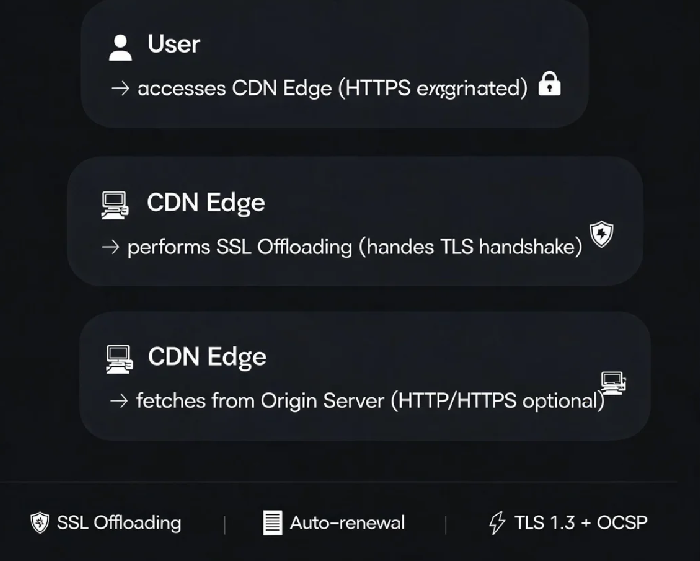
Last year, a client upgraded their website to HTTPS and immediately started getting complaints. Pages were loading noticeably slower. "Isn't HTTPS supposed to be more secure? Why is it slower?" They had left all the TLS handshake and encryption work to their origin server. CPU usage on the origin had shot up to 80%.
This is the most common misunderstanding about HTTPS acceleration: HTTPS isn't slow by nature. The problem is how you deploy it.
01 Why HTTPS Can Be Slower — and How to Fix It
HTTPS is slower than HTTP primarily because of the TLS handshake . When a user visits an HTTPS site, the browser and server need to complete a cryptographic negotiation before any data can be transmitted. This takes 2-3 round‑trip times (RTT). On poor network connections, this delay is amplified.
The other issue is encryption overhead. Every packet transmitted over HTTPS needs to be encrypted and decrypted. If your origin server handles all this work alone, CPU becomes the bottleneck.
The core dilemma: Security demands encryption, encryption demands computation, and computation demands resources. With limited resources, security can hurt speed.
The Solution: SSL Offloading
SSL offloading lets your CDN handle the heavy lifting. Edge nodes terminate the TLS connection, decrypt traffic, and forward plaintext requests to your origin over HTTP or HTTPS .
With SSL offloading enabled, origin CPU dropped from 80% to 30%, and user access actually became faster than before.
02 Certificate Management: Stop Losing Traffic to Expired Certificates
Free SSL certificates typically last 90 days. Paid certificates usually last one year. If you forget to renew, browsers will show a red warning: "Certificate expired." Users won't proceed. Traffic stops.
Why certificate hosting matters: When you host your SSL certificate on the CDN platform, the provider handles expiration reminders and automatic renewal . When a certificate is about to expire, cloud platforms typically send reminders 30, 15, and 7 days in advance via SMS, email, and in‑platform notifications . If you opt for managed certificate hosting (available on Alibaba Cloud, Tencent Cloud, and Huawei Cloud), you can enable automatic renewal and push to CDN nodes without any manual intervention .
03 Certificate Types and Matching Rules
Certificate types: DV (Domain Validation) suits personal blogs. OV (Organization Validation) suits business websites — your company name appears in the address bar. EV (Extended Validation) suits high‑security use cases like finance and government.
Matching rules: The certificate must match the accelerated domain name . www.example.com requires a certificate for www.example.com — you cannot use a wildcard *.example.com certificate for a specific subdomain. A wildcard certificate (*.example.com) covers all first‑level subdomains like www, api, and cdn .
04 OCSP Stapling: The Hidden Speed Boost
OCSP is the mechanism browsers use to check whether a certificate has been revoked. With OCSP stapling, the CDN node caches the certificate status and "staples" it to the TLS handshake response, so the browser doesn't need to query the CA separately . This reduces certificate validation time by 30‑50%, especially beneficial for mobile users on slower networks.
The Bottom Line
That client eventually hosted their SSL certificate on the CDN and enabled SSL offloading. Origin CPU dropped to 30%. Page load times improved. He said: "I used to be afraid of HTTPS slowing my site. Now I know — HTTPS doesn't have to be slow if you let the CDN handle the heavy lifting."
The core principle of HTTPS acceleration: Let the CDN handle the cryptography. Let your origin do what it does best — serving your application.
