Slow in the Data Warehouse? Performance Tuning for Redshift, BigQuery, and Snowflake
Last year, a client moved their data warehouse to Redshift. They expected it to be much faster than their old self‑managed system. Two months later, business users complained: a quarterly report that used to take 10 minutes now took 40 minutes. Their first reaction was to add more nodes.
I asked them to pause. “Let me look at the query first.”
The slow query was scanning the entire table. The table was sorted by date, but the query was filtering by user ID. Every run touched every block. Adding nodes would help, but it wouldn’t fix the root cause.
We added a sort key on user ID. The same query dropped from 40 minutes to 6 minutes. No new nodes.
This is the most common mistake in data warehouse performance tuning: assuming slow means you need more resources, when often it means you’re using the warehouse wrong.
Today, let’s talk about performance tuning for Redshift, BigQuery, and Snowflake. Not the “data warehouses are fast” intro, but a practical guide: where to look first, how each platform differs, and when scaling is truly the last resort.
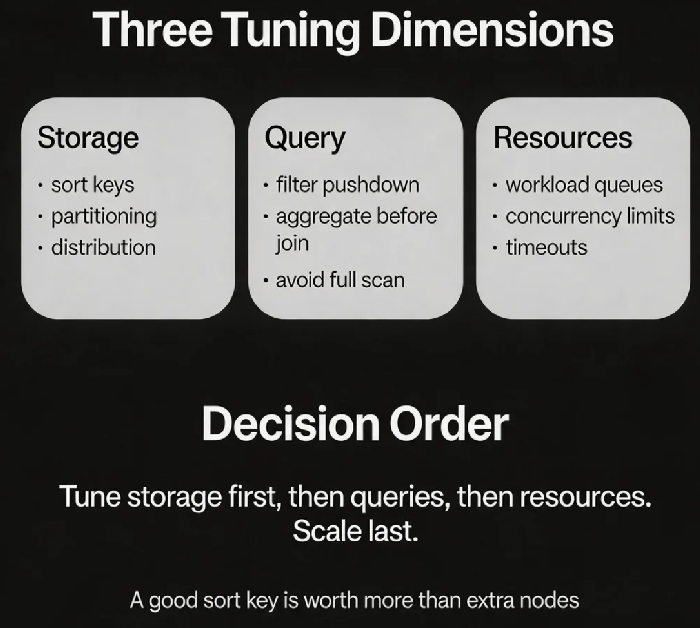
01 The Three Dimensions of Data Warehouse Performance
A slow data warehouse almost always falls into one of three categories.
| Dimension | Core question | What to look at |
|---|---|---|
| Storage | How is the data organized? | Sort keys, partitioning, distribution, compression |
| Query | How is the SQL written? | Filter pushdown, aggregation before join, scan avoidance |
| Resources | How is concurrency managed? | Queues, isolation, timeouts |
That client’s problem was in the storage layer. The table was sorted by date, but the query filtered by user ID. Full scan. Adding a sort key on user ID limited the scan to the relevant blocks.
02 Storage Optimization: How Data Is Laid Out
Data warehouses don’t have traditional indexes. Performance depends on physical data organisation.
Redshift: Sort keys and distribution styles
Sort key: Defines the physical order of data on disk. Columns that are frequently used in filters should be sort keys. A table can have one sort key (compound sort keys are stored in order).
Distribution style: Controls how data is distributed across nodes.
KEYdistribution (hash on a column) is good when that column is used in joins.ALLdistribution (full copy on every node) is good for dimension tables.AUTOworks for small tables.
That client’s table had AUTO distribution. Data was randomly spread. Joins caused lots of data movement across nodes. Changing to KEY distribution on the join column localised the data movement.
BigQuery: Partitioning and clustering
Partitioning: Split a table by a date/timestamp column. Queries that include the partition column in the filter scan only relevant partitions.
Clustering: Automatically organises data based on one or more columns. Good for high‑cardinality columns (e.g., user ID).
Snowflake: Automatic micro‑partitioning
Snowflake automatically manages micro‑partitions and statistics. You have less control. Focus on query optimisation.
03 Query Optimisation: Writing for Speed
After storage is tuned, look at the SQL.
Avoid full scans – If you have a partition or sort key, always include it in the filter when possible.
Push filters early – Most warehouses push WHERE conditions down to the storage layer. Use them.
Aggregate before joining – Reduce the dataset size as early as possible. A subquery that aggregates then joins will be much faster than joining raw data.
Join order – not as critical as you think – Modern optimisers (including BigQuery and Snowflake) reorder joins automatically. What still matters: avoid cross joins, and keep join keys on columns with good data distribution.
Avoid SELECT * – Columnar storage reads every column you request. Fetch only what you need.
That client had a query that joined raw data from a large fact table, then aggregated the result. Rewriting it to aggregate first (reducing 1 billion rows to a few thousand) before joining dropped the runtime from 15 minutes to 2 minutes.
04 Resource Management: More Concurrency Isn’t Always Better
Data warehouses are shared resources. Too many concurrent queries slow everyone down.
Redshift: WLM (Workload Management)
Create separate queues for different query types (short queries, long queries, ETL).
Set concurrency limits per queue. Queries beyond the limit wait.
Set timeouts – cancel queries that run too long.
BigQuery: Slots
Projects have a shared slot pool (on‑demand pricing) or dedicated slots (capacity pricing).
Queries compete for slots. A single big query can consume many slots and starve others.
Snowflake: Virtual warehouses
One warehouse = a set of compute resources. Different workloads use different warehouses – naturally isolated.
Choose warehouse size (Small to XXLarge) based on query complexity.
Multiple warehouses run concurrently without interfering.
That client had all queries in a single queue. Long‑running ETL jobs blocked short BI queries. Splitting into separate queues (one for ETL, one for BI) eliminated the blocking.
05 Materialised Views: Pre‑compute for Speed
For repeated aggregation patterns (e.g., daily reports), materialised views can be a game changer.
Redshift: Supports materialised views with automatic incremental refresh.
BigQuery: Supports materialised views; the query engine automatically rewrites queries to use them.
Snowflake: Supports materialised views but requires manual refresh.
That client had a daily report that ran a full aggregation each time. After creating a materialised view that pre‑aggregated by day, queries against the MV ran in seconds instead of minutes.
06 A Real Story: From 40 Minutes to 6 Minutes (No New Nodes)
A client’s quarterly report had slowed from 10 minutes to 40 minutes. We did four things:
Added a sort key: The table was sorted by date, but the query filtered by user ID. We added a compound sort key
(user_id, date). Scan volume dropped dramatically.Changed distribution style: From
AUTOtoKEYon the user ID column. Joins became local.Rewrote the query: Moved aggregation into a subquery before joining.
Split a monster query: One huge SQL was broken into three temp tables, executed sequentially.
No new nodes. The report ran in 6 minutes. Their ops lead said: “I used to think a slow data warehouse meant I needed to spend money. Now I know – first check how data is stored, then check the SQL, then think about scaling.”
The Bottom Line
When your data warehouse slows down, don’t reach for the “add more nodes” button.
First, check storage. Are the sort keys right? Is the data distributed well? Are you using partitioning (BigQuery) or micro‑partitions effectively?
Second, check the SQL. Are you pushing filters? Are you aggregating early? Are you scanning columns you don’t need?
Third, check resource management. Are long queries blocking short ones? Are queues properly separated?
Scaling is the last resort, not the first step.
That client’s ops lead later made a short mantra: “Sort keys first. Push filters. Aggregate before join. Separate queues. If all else fails, scale.”
Your data warehouse is slow. Where will you look first?