Global Traffic Steering: Multi‑Site Active, Geo‑Routing, and Automatic Failover
Last year, a client expanded globally. They deployed in Beijing and Virginia. Users in Virginia were fast. Users in Europe talked to Virginia – across the Atlantic – 150ms latency. Users in Southeast Asia talked to Beijing – also far. Complaints poured in.
Their solution? DNS geo‑routing. European users → Virginia. Southeast Asia → Beijing. North America → Virginia. Sounds reasonable. But European users still had 150ms latency.
I asked: “Why not deploy a site in Europe?”
“Data sync is hard. And user volume there doesn’t justify another full site.”
“At least add CDN in Europe?”
“We did. Dynamic endpoints are still slow.”
This is the classic global traffic steering dilemma: users everywhere, you want them to go to the nearest site, but data sync, cost, and architecture complexity get in the way.
Today, let’s talk about global traffic steering. Not the “geo‑DNS is important” intro, but a practical guide: active‑passive vs active‑active, geo‑routing, automatic failover, and how to handle data when users are far apart.
01 Three Global Architecture Patterns
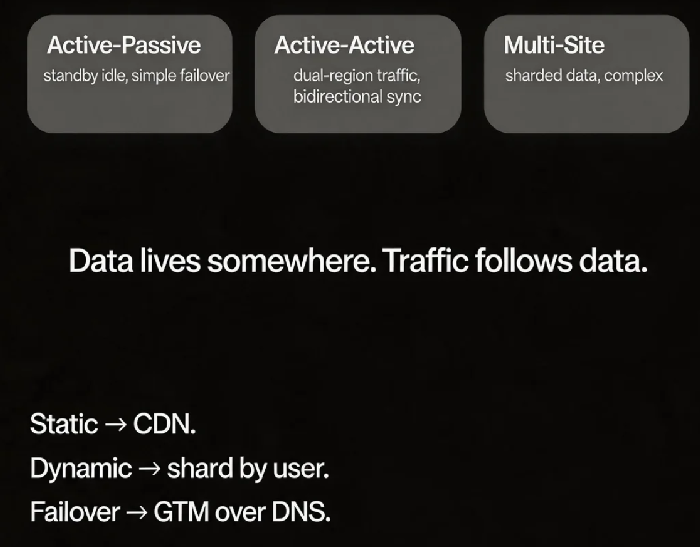
Pattern 1: Active‑Passive (Primary‑Standby)
Primary region handles all traffic. Standby region has instances but receives no traffic (or only a small percentage). On failure, DNS or GTM shifts traffic to the standby.
Pros: Simple architecture, less demanding data sync
Cons: Standby capacity is mostly idle; failover has delay (DNS cache, data sync lag)
Pattern 2: Active‑Active
Both regions handle traffic. Data synchronises bidirectionally or with a primary‑replica relationship.
Pros: Higher resource utilisation, faster failover
Cons: Complex data sync, conflict resolution hard; cross‑region calls add latency
Pattern 3: Multi‑Site Active (Active‑Active‑Active)
Three or more regions serve traffic. Data is sharded or eventually consistent.
Pros: Excellent scalability, single‑region failure has limited impact
Cons: Extremely complex architecture; data consistency is a major challenge
That client started with active‑passive: primary in Beijing, standby in Virginia. European users talked to Virginia (high latency). Southeast Asian users talked to Beijing (also high latency). They moved to active‑active: North America and Europe → Virginia; Asia‑Pacific → Beijing. But bidirectional data sync led to frequent conflicts.
02 Geo‑Routing: More Than DNS Geo‑Resolution
Many people think geo‑routing means “DNS returns the IP of the nearest region.” That solves the entry point. It does nothing for backend data latency.
True geo‑routing must consider:
Static content – CDN caches at edge nodes. Easy.
Dynamic requests – They need to compute or read data. If the user is in Beijing but the primary database is in Virginia, the request still crosses the ocean.
Solutions:
Data sharding – Assign users to a region based on user ID. Chinese users’ data in Beijing. US/EU users’ data in Virginia. DNS + routing rules send users to their data’s home region.
Global database – Aurora Global Database, Spanner, or similar. Writes go to the primary region; reads go to local replicas.
That client adopted data sharding: Asia‑Pacific user data in Beijing; North America and Europe user data in Virginia. DNS geo‑routing, combined with application‑level sharding rules, sent most requests to the correct data region. Cross‑region reads and writes dropped dramatically.
03 Automatic Failover: DNS vs GTM
When a region fails, traffic must be shifted to a healthy region.
DNS failover: Change the DNS record to point to the healthy region. Downside: DNS caching delays failover (TTL is often 60‑300 seconds). During the cache lifetime, many users still hit the failed region.
GTM failover: Global Traffic Manager (AWS Global Accelerator, Azure Traffic Manager, Alibaba Cloud GTM). It performs real‑time health checks and steers traffic without client‑side changes.
That client used DNS failover with TTL=60 seconds. On failure, the fastest failover took over a minute. They switched to GTM with health checks every 30 seconds. After three consecutive failures, traffic was shifted – total cutover under two minutes, and clients were completely unaware.
04 Data Synchronisation: The Hardest Part of Global Architecture
For global traffic steering, the hardest part isn’t traffic – it’s data.
Sync options:
| Approach | Pros | Cons | Best for |
|---|---|---|---|
| Primary‑replica replication | Simple, no conflicts | Standby regions read‑only, write latency high | Active‑passive |
| Bidirectional sync | Low‑latency writes from anywhere | Conflict resolution complex | Active‑active |
| Data sharding | No cross‑region writes | Requires application changes | Multi‑site active |
| Global database | Transparent to app | Expensive, vendor lock‑in | Active‑active / multi‑site |
That client’s sharding approach avoided bidirectional sync conflicts. Writes always went to the region that owned the data. Other regions read local replicas (for cacheable data) or made explicit cross‑region calls (for low‑frequency scenarios).
05 The Cost of Cross‑Region Calls
Even with sharding, you still have cross‑region calls: for example, a user in Beijing looks at a profile of a user whose data lives in Virginia.
Problem: Cross‑region latency is high (Beijing to Virginia ≈ 150‑200ms). Users notice.
Mitigations:
Make it asynchronous – If the response doesn’t need to be real‑time, use a message queue.
Cache aggressively – Non‑sensitive data can be replicated to all regions with a short TTL.
Accept the latency – For low‑frequency operations (e.g., viewing an old order from a different region), 200ms is tolerable.
That client cached public profile data with a 24‑hour TTL in all regions. Most profile views hit the local cache. Only the first view after the cache expired or when data changed triggered a cross‑region read.
06 A Real Story: From Global Lag to Sharded Acceleration
A SaaS client had a global user base. Their primary database was in the US. Users everywhere read and wrote directly to it. European users had 150ms latency. Australian users had 200ms.
They redesigned:
Data sharding: User data was pinned to the region where the user was registered.
DNS geo‑routing: Users were sent to the region that owned their data.
Global read replicas: Each region had a local replica. Cross‑region reads went to the local copy.
Cross‑region writes: For the rare case where a write had to go to another region, the application accepted the latency.
After the change, P99 latency dropped from 150ms to under 50ms for most requests. Their ops lead said: “We used to think slow meant we needed more bandwidth. Now we know – the distance itself was the problem.”
The Bottom Line
Global traffic steering isn’t about traffic. It’s about data. Data lives somewhere. Traffic must follow it.
That client’s architect later made up a short mantra: “Static content? CDN. Dynamic requests? Shard by user. Active‑passive is simple. Active‑active is complex but powerful. For failover, use GTM, not DNS. And remember – latency isn’t always bandwidth. Sometimes it’s geography.”
Where are your users? Where is your data? Answer those two questions, and the right traffic pattern will follow.