Cloud Load Testing from A to Z: Scripting, Execution, Bottleneck Analysis – Know Your System’s Limit
Before last Singles’ Day, a client confidently told me: “Our system will be fine. We handle three times the normal traffic without breaking a sweat.”
I asked: “Have you load‑tested it?”
“Yes, we ran JMeter with a few hundred concurrent users. Everything passed.”
On the day, traffic did reach three times the normal level. By minute five, the system crashed. The code was fine. The database was fine. The culprit? Logging. In the test environment, the log level was WARN. In production, it was INFO. The server wrote thousands of log lines per second, and the disk I/O saturated.
This is the classic load‑testing trap: what you tested and what runs in production are not the same thing.
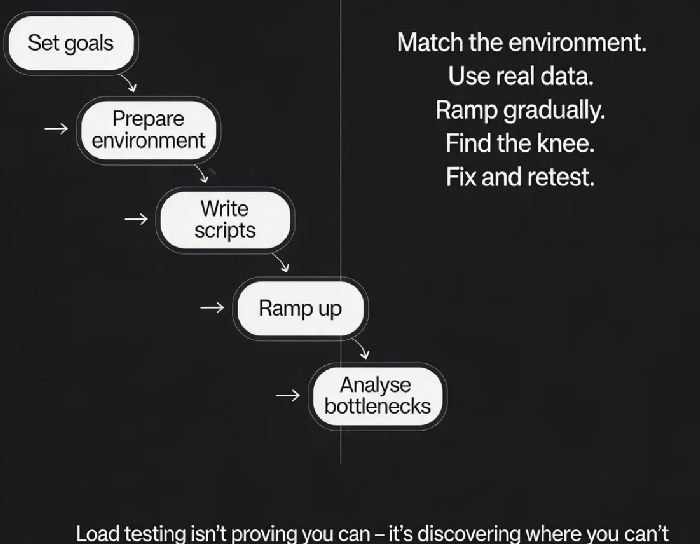
Today, let’s walk through the complete cloud load testing process. Not the “load testing is important” intro, but a practical guide: from setting goals to writing scripts, from executing to analysing bottlenecks – how to find your system’s real limit.
01 Define Your Goals First
Many people start a load test with a vague goal: “Let’s see how much it can handle.” That’s curiosity, not a goal.
Before you run any test, answer three questions.
First, which business scenarios? The critical path – checkout, login, product browse – and the non‑critical ones. Map out the user journey during peak traffic. Don’t miss key steps.
Second, what are the target numbers? Target QPS, target response time (P99), target error rate. Without targets, a load test is just random noise. Use historical peak data as a baseline.
Third, what failure is acceptable? Can you tolerate a few timeouts, or must they be zero? Is graceful degradation acceptable, or must the full chain work? Define your red lines.
That client’s goal was “handle 3× traffic.” But they didn’t break down QPS by scenario (checkout, add‑to‑cart, search). They ran a single mixed test, and the results were misleading.
02 Prepare the Environment – Make It Look Like Production
Eighty percent of misleading load test results come from an environment that doesn’t match production.
Hardware must match. 4‑core 8GB in test vs 8‑core 16GB in production yields meaningless results.
Data volume must be similar. A production orders table with 100 million rows behaves very differently from a test table with 10,000 rows. Execution plans change. Index scans become full table scans.
Log level must be the same. That client’s failure was here. WARN in test, INFO in production – disk I/O was massively higher.
Dependencies should be real or realistic. If you mock a payment gateway, the mock’s latency and behaviour must match the real one. If you call the real dependency, coordinate with the team – don’t take them down.
That client rebuilt their test environment: anonymised production data, hardware matching production, and the same log level. The next test accurately predicted production behaviour.
03 Write Realistic Scripts – Random Parameters, Real Pauses
Unrealistic scripts produce unrealistically good results.
Model user think time. Real users don’t hammer the API continuously. Add think time between requests – random intervals, say 100‑500ms.
Randomise parameters. Fixed parameters cause artificially high cache hit ratios or uneven load distribution. Use CSV files with a pool of realistic values (user IDs, product IDs). Each virtual user should get different inputs.
Assert on business status, not just HTTP status. An API can return HTTP 200 but a business error code (e.g., “insufficient inventory”). If your script only checks for 200, it will count failed requests as successes.
That client’s script only tested the checkout endpoint. On sale day, the login endpoint failed first. Users couldn’t get in, so the checkout endpoint never received any traffic.
04 Execute Gradually – Ramp Up, Find the Knee
Don’t hammer the system at full throttle from the start. Ramp up gradually.
Step load test. Start with 100 concurrent users, run for 3 minutes. Increase to 500, run for 3 minutes. Increase to 1000, and so on. Observe TPS, response time, and error rate at each step.
Find the knee. When TPS stops increasing with concurrency and begins to drop, you’ve reached the system’s limit. That TPS number is your capacity.
Spike test. Simulate a sudden traffic burst. Go from idle to peak in seconds. See if the system can handle it.
Endurance test. Run at the target load for 30+ minutes. Watch for memory leaks, connection pool exhaustion, or gradual degradation.
That client only did a step load test. On sale day, traffic arrived as a spike, not a gradual ramp. Their system wasn’t ready for the shape of the traffic.
05 Analyse Bottlenecks – Follow the Evidence
The test is done. You have numbers. Now find the bottleneck.
Which metric broke first? Did TPS plateau? Did response time spike? Did error rate rise? Did a system resource saturate? Identify the anomaly type first.
Layered investigation:
Application layer: endpoint latency distribution, GC logs, thread pool state
Database layer: slow queries, connection count, CPU
Cache layer: hit ratio, connection count
Middleware: queue depth, connection count
Infrastructure: CPU, memory, disk I/O, network bandwidth
Common bottlenecks:
TPS plateaus while CPU is low → lock contention, thread pool limits, slow external dependencies
CPU saturates → inefficient code, tight loops, CPU‑intensive work
Database CPU high → slow queries, missing indexes, unoptimised SQL
Disk I/O high → logging, temporary tables, swapping
Memory climbs steadily → memory leak
That client’s bottleneck turned out to be disk I/O. At the target concurrency, disk write latency jumped from 1ms to 200ms. The root cause was the higher log level in production, causing 30× more disk writes than in the test environment.
06 Optimise and Re‑test – Close the Loop
Find the bottleneck. Fix it. Then run the test again.
Validate the fix. Compare before/after. Did TPS increase? Did response time drop?
Regression test related scenarios. Ensure that fixing one bottleneck didn’t degrade another.
Update the baseline. The new performance numbers become your reference for the next test.
That client changed the log level back to WARN (and sampled critical business logs separately). The retest showed TPS climbing from 800 to 2200. Disk I/O returned to normal.
The Bottom Line
Load testing isn’t about running a script and generating a report. It’s the foundation of capacity planning and the last line of defence before a launch.
That client’s ops lead later said: “Load testing isn’t about proving how strong your system is. It’s about discovering how weak it is. The more weaknesses you find, the stronger it becomes after you fix them.”
Does your load test prove that you’re ready – or does it help you learn what you haven’t fixed yet?