Zero-Downtime Schema Changes: Cloud Data Versioning and Schema Evolution in Practice
Last year, a client needed to add a column to a critical table a week before their biggest sale. The DBA ran an estimate: 120 million rows. ALTER TABLE would lock the table for 10–15 minutes. The business owner said, “Fifteen minutes of downtime before the sale? Absolutely not.”
The DBA shrugged. “That’s how MySQL works.”
They used pt-online-schema-change instead. The column was added with zero downtime. No one noticed.
This is the misconception many developers and DBAs still have: schema changes require downtime. They don’t.
Today, let’s talk about zero‑downtime schema changes and schema evolution. Not the “be careful with ALTER TABLE” intro, but a practical guide: how to change schemas without blocking your application, how to keep old and new code compatible, and how to roll back if something goes wrong.
01 Why ALTER TABLE Doesn’t Always Block
Many people’s mental model of MySQL ALTER TABLE is stuck in the 5.5 era: any schema change locks the table. Since MySQL 5.6, most operations can be performed online without blocking reads and writes.
Locking risk by operation type:
| Operation | Lock risk | Notes |
|---|---|---|
| Add column (last position) | Low | Metadata lock only (5.6+) |
| Add index | Low | Read/write allowed during build |
| Drop index | Low | Nearly instant |
| Change column type | High | Requires table rebuild |
| Rename column | Medium | Depends on context |
| Add primary key | High | Requires table rebuild |
| Drop column | Medium–High | May require rebuild |
That client added a regular column at the end of the table. On MySQL 8.0, a direct ALTER would have been fine with a very short lock. They were still on 5.7, and the table was large, so pt-online-schema-change was the safer choice.
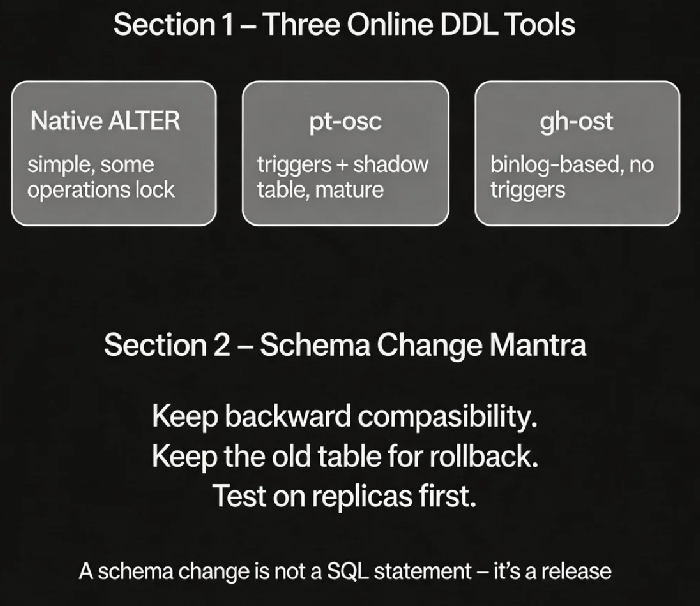
02 Online Schema Change Tools: pt-osc and gh-ost
When native Online DDL is too risky or not sufficient, use dedicated tools.
pt-online-schema-change (Percona Toolkit)
How it works: create a new table with the desired structure, add triggers to copy incremental changes, copy existing data in chunks, then atomically swap the tables.
Pros: Mature, stable, works on all MySQL versions.
Cons: Requires triggers (affects replication), brief “swap” blip on large tables.
gh-ost (GitHub open source)
How it works: uses the binary log to capture incremental changes. No triggers. Less load on the primary.
Pros: No triggers, safer, load‑throttling built in.
Cons: Requires binlog_row_image=FULL, some additional load on replicas.
That client used pt-osc. The 120‑million‑row change took 25 minutes. During the entire period, the application worked normally. There was a sub‑second blip during the final table swap, which application‑level retries handled gracefully.
03 Backward Compatibility: The Golden Rule for Coexistence
Changing the schema is only half the problem. The harder part is handling the period when old and new code versions run side by side.
Golden rule: New code must run on the old schema. Old code must run on the new schema.
Adding a column:
The new column must have a default value or allow NULL. Old code (which doesn’t know about the column) must be able to insert rows without specifying it.
New code writes the column. Old code ignores it – the business must tolerate that.
Removing a column:
First, change the code to stop reading the column. Deploy that change everywhere. Then remove the column from the schema.
Never remove a column before updating the code. Old code will fail.
Changing a column’s type:
Avoid direct
ALTER. Instead, add a new column, dual‑write, migrate data, switch code, then drop the old column.
That client added the column with DEFAULT NULL. Old code inserted rows without setting the column (the value became NULL), and business logic tolerated it. New code set the column as needed.
04 Gradual Rollout: Let Some Tables Go First
Running a schema change directly on a production core table is risky. Stage it.
Strategy 1: Replica first, then primary – Run the change on a replica. Observe. If everything looks good, run it on the primary.
Strategy 2: Change small tables first – Validate the tool and process on small, non‑critical tables. Then move to larger tables.
Strategy 3: Roll out by business module – Change tables in non‑critical modules first, then the core module.
That client first ran pt-osc on a replica. Then they tested the process on a non‑critical table. After that, they ran it on the critical orders table.
05 Rollback: What If Something Goes Wrong?
Rolling back a schema change is harder than rolling back code. Code redeployment reverts quickly. A schema change may have already transformed data.
Rollback strategies:
Keep the old table –
pt-oscleaves the old table behind. If something goes wrong, you can rename it back. Use the--no-drop-old-tableflag.Keep the old column – When adding a column, keep it for a while before removing it. For type changes, keep the old column and dual‑write.
Gradual rollback – If the new schema has problems but the old table is still there, switch back instantly.
After the change, that client kept the old table for 24 hours. They manually removed it only after confirming that everything worked. If there had been an issue, they could have switched back in seconds.
06 A Real Story: A 2‑Hour Lock That Shouldn’t Have Happened
A client had a 50‑million‑row orders table. A DBA ran ALTER TABLE orders ADD COLUMN source VARCHAR(20) directly. MySQL 5.7, without Online DDL optimisations, locked the table for nearly 2 hours. Order processing stopped. The business took a significant loss.
After the incident, they switched to pt-osc:
They tested the process on a replica first.
They set
chunk-size=1000to copy data in small batches.They set
max-loadso the tool would pause if the primary CPU exceeded a threshold.The change took 40 minutes. Business operations were unaffected.
Their tech lead said: “I used to think a schema change was just a SQL statement. Now I know it’s a release – with a rollout plan, a rollback plan, and a blast radius.”
The Bottom Line
Zero‑downtime schema changes are not impossible. They just require the right tools and process.
That client’s ops lead later made up a short mantra: “For adding columns or indexes, use an online tool. For removing or changing types, change code first. Keep backward compatibility. Keep the old table for rollback. Test on replicas and small tables before the big one.”
Next time you need to change a table, ask three questions: Will it lock? Are old and new code compatible? What’s my rollback plan? Answer those, then change safely.