Self-Healing Systems in Production: Automatic Failover and Hands‑Off Recovery
Last year, a client was woken at 3 AM. The database connection pool was exhausted. Restarting the application fixed it. The next day, they traced the root cause to a scheduled job that never closed connections.
“Couldn’t this have been handled automatically?” they asked me.
“Would restarting the app lose data?”
“No, it’s stateless.”
“Then why didn’t the system restart itself?”
They paused. “I never thought to make it automatic.”
This is a common mindset: alert fires, human fixes. But if a human can fix it, a script can too.
Today, let’s talk about self‑healing systems. Not the “automation is important” intro, but a practical guide: which failures can self‑heal, how to design recovery rules, and how to avoid over‑automating dangerous actions.
01 Which Failures Should Self‑Heal?
Not every failure is suitable for automatic recovery. Three criteria.
First, clearly detectable. You need a crisp condition – “three consecutive failed health checks” or “error rate >5%”. If you can write the rule, you can automate it.
Second, recoverable by script. Restarting, draining traffic, failing over to a standby, scaling out, rolling back – these are scriptable. Data repair or code‑level bug fixes are not.
Third, acceptable cost. Will a restart drop connections? Will a failover lose data? If the cost is high, keep a human in the loop.
That client’s connection‑pool exhaustion was clear (pool full), recoverable by script (restart app), and the cost was low (stateless app). A perfect candidate for self‑healing.
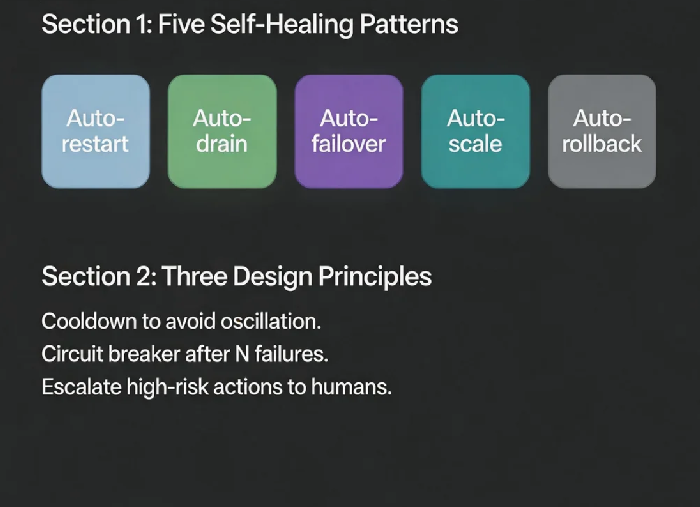
02 Common Self‑Healing Patterns
Pattern 1: Auto‑restart
For stateless apps, memory leaks, deadlocks.
Implementation: Kubernetes livenessProbe. Fail → restart.
Pattern 2: Auto‑draining
For slow or failing instances.
Implementation: Load balancer health checks. Unhealthy → removed from rotation. Healthy → added back.
Pattern 3: Auto‑failover
For primary database or primary AZ failure.
Implementation: Multi‑AZ database failover, DNS failover, cross‑AZ load balancing.
Pattern 4: Auto‑scaling
For traffic spikes or resource exhaustion.
Implementation: Metric‑based or scheduled scaling. Add capacity when needed.
Pattern 5: Auto‑rollback
For bad deployments.
Implementation: Monitor error rates. If they exceed a threshold after a release, automatically roll back to the previous version.
That client added a livenessProbe that called their /health endpoint. Three consecutive failures triggered a pod restart. They never got paged for that problem again.
03 Designing Self‑Healing Rules: Don’t Be Too Aggressive
Self‑healing rules need guardrails. You don’t want the system to heal itself to death.
Cooldown period – Don’t restart the same instance repeatedly in a short window. If it restarts three times and still fails, self‑healing won’t work. That’s a circuit breaker.
Time window – Be more aggressive during low‑traffic hours (e.g., 2‑6 AM) and more conservative during peak hours.
Blast radius control – Heal one instance at a time. Observe. Then heal others.
Confirmation for high‑risk actions – Failing over a primary database? Send an alert and wait for a human “approve” button. Restarting a stateless pod? That can be fully automatic.
That client set their rules: between 2 AM and 6 AM, auto‑restart was allowed. During the day, only alert. After three restarts of the same pod, a circuit breaker triggered and paged an on‑call engineer.
04 Recovery Validation: It’s Not Over After the Action
Self‑healing isn’t “run the action and done.” You must verify that the system actually recovered.
Validation methods:
Re‑run the health check – it should pass.
Sample a few business requests – they should succeed.
Check key metrics (error rate, latency) – they should return to normal.
Validation timeout – Give the recovery action a budget. For example, after a restart, the pod has 30 seconds to become healthy. If it doesn’t, declare the healing attempt failed and escalate.
That client’s livenessProbe had failureThreshold: 3 and periodSeconds: 10. After a restart, the pod had 30 seconds to pass the health check. If it failed, Kubernetes would restart it again – up to the circuit breaker limit.
05 The Boundary: Know When to Hand Over to a Human
Self‑healing isn’t a silver bullet. Some failures should never be automated.
Not suitable for self‑healing:
Data corruption – automatic recovery might overwrite more good data.
Configuration errors – restarting won’t help; the config is still wrong.
Dependency failures – restarting yourself doesn’t fix a downstream service.
Security incidents – you need a human to investigate; automatic cleanup may erase evidence.
How to set boundaries:
Self‑heal only idempotent, reversible actions.
Set circuit breaker thresholds. After N consecutive failures, stop and page a human.
Log every self‑healing action for audit.
That client limited self‑healing to “stateless app restart” and “auto‑scaling.” Database failover and auto‑rollback still required a human approval step.
06 A Real Story: Automatic Disk Cleanup – No Human Needed
A client’s log disk regularly filled up. Their operations team was paged at night to manually delete old logs.
We designed a self‑healing rule:
Monitor disk usage. Trigger at 85%.
Automatically run
find /var/log -type f -mtime +7 -delete(remove logs older than 7 days).Re‑check disk usage.
If usage dropped below 80%, success – log the action.
If usage still above 85%, the log rotation rate is too high – escalate to a human.
Six months later, their ops lead said: “We haven’t been woken up for a full disk in half a year.”
The Bottom Line
The goal of self‑healing is not to eliminate people. It’s to free them from repetitive toil.
That client’s ops lead later said: “99% of the alerts that woke me up at 3 AM were for repeatable problems. If it can be scripted, don’t make a human carry it.”
Self‑healing doesn’t replace people. It lets them spend time on what matters: fixing the bugs that automatic recovery can’t handle, and improving the architecture that keeps breaking.
What’s the most common 3 AM alert on your team’s dashboard? Write a script. Let the system fix itself. Go back to sleep.